Cutting Claude Code costs: watch /usage, tune effort levels
How to check token usage and estimated cost with Claude Code's /usage, and how to choose among effort levels (low to max), based on Anthropic's official documentation.
Contents (4)
With Opus 5.5, Claude Code’s default effort is now medium, and the per-token price is lower than Opus 5. Even so, the basic relationship hasn’t changed: the higher the effort, the more the model thinks, and the more it costs.
Check token usage and estimated cost for the session with /usage, and adjust the effort to match the work.
What /usage shows
Run /usage and the Session block at the top of the screen shows the tokens used in the current session and the estimated cost.
Total cost:            $0.55
Total duration (API):  6m 20s
Total duration (wall): 6h 33m 10s
Total code changes:    0 lines added, 0 lines removed
Usage by model:
   claude-sonnet-4-6:  1.2k input, 5.3k output, 940.0k cache read, 50.0k cache write ($0.55)
Source: Manage costs effectively (Claude Code documentation)
Total cost is an estimate calculated locally from token counts and list prices. Unless an organization admin has set contract rates, it isn’t the amount you are actually billed. For Pro and Max subscribers the usage is covered by the plan’s allowance, so this figure doesn’t affect billing. For the exact amount, check the Usage page in the Claude Console.
The total returns to 0 when you reset the conversation with /clear. The longer a session runs, the more the number accumulates, so using /clear when you switch to unrelated work lets you see the cost of the next task separately.
After the first exchange, a Prompt cache (main) line also appears. It shows what percentage of requests were read from the cache, how many cache misses occurred, and whether the cache is still within its lifetime (warm or cold). The prompt cache lasts 1 hour on a subscription and 5 minutes by default with an API key. Once it expires, the next request has to re-read the whole conversation, and cost jumps. Not leaving long gaps in your work is also a way to avoid wasting the cache.
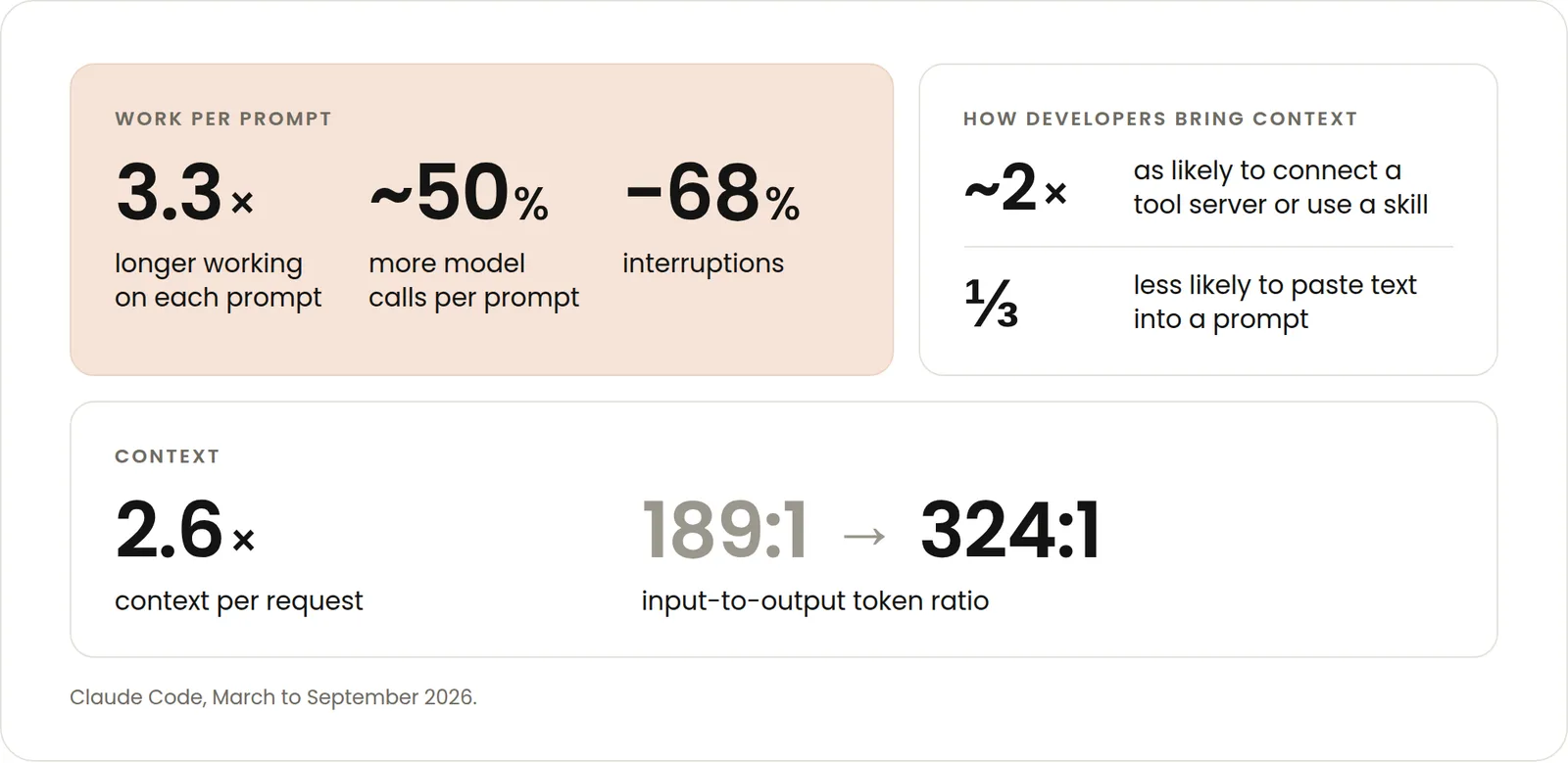
The official blog explains why the cache line matters. Anthropic aggregated Claude Code usage from March to September 2026. The context loaded per request grew about 2.6 times, and the ratio of input to output tokens went from 189:1 to 324:1. Claude reads far more than it writes.
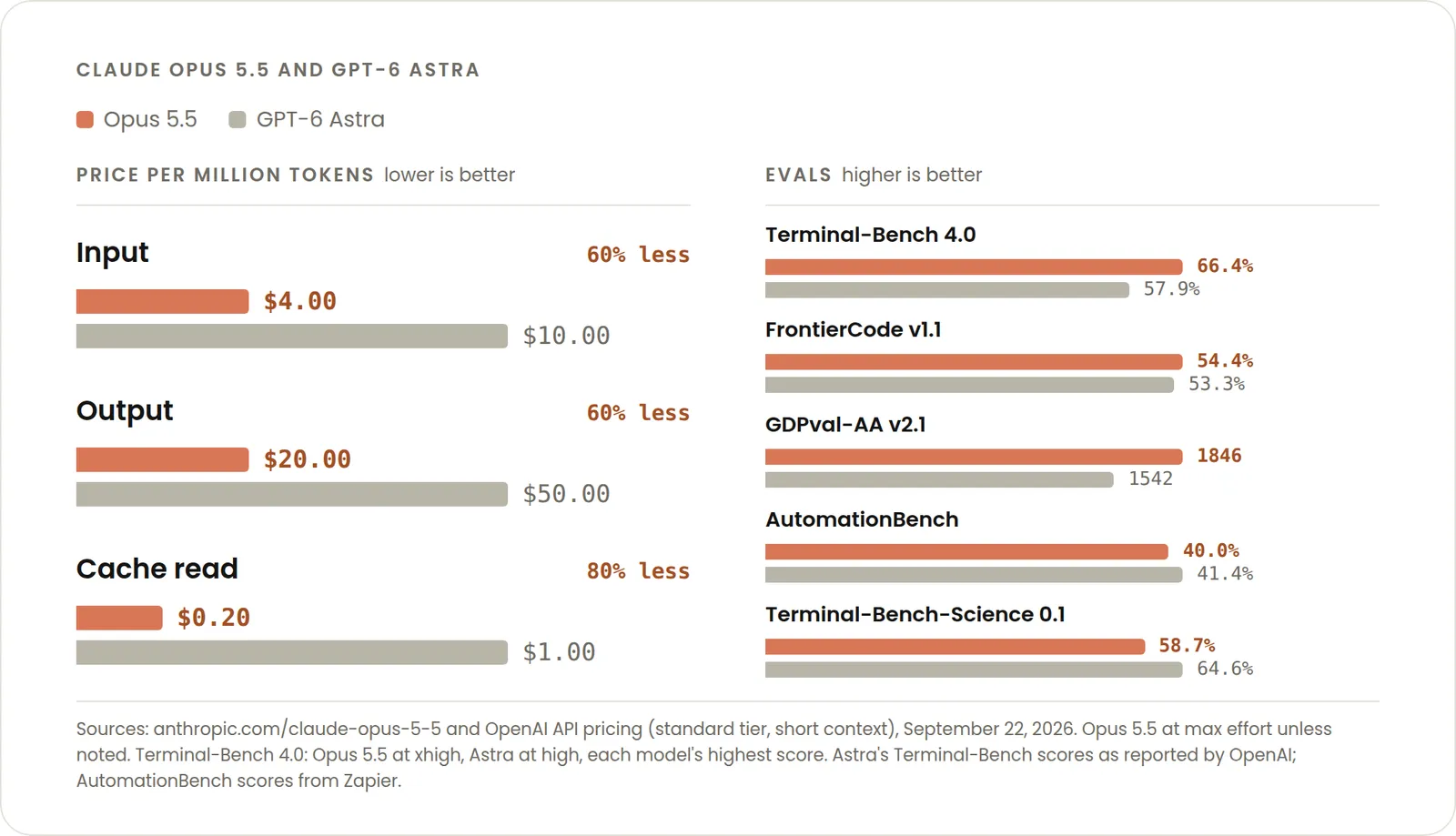
As a result, cache reads account for most of the cost in agent and coding work. With Opus 5.5, the input and output prices fell by 20%, and the cache-read price fell by 60%. The left side of the chart below shows the prices: per million tokens, input costs $4, while a cache read costs $0.2.
The same blog recommends using /usage to check the share read from the cache and keeping that share from dropping. One habit that helps is not switching models in the middle of a session.
On the Pro, Max, Team and Enterprise plans, /usage also shows a breakdown of usage over the last 24 hours or 7 days. You can see the share of usage by skill, subagent and MCP server, along with the factors pushing cost up, such as long context and cache misses.
The five effort levels and when to use each
Effort sets how deeply Claude Code has the model think. The higher the level, the more steps the model reasons through, and the more tokens it uses.
Anthropic’s documentation describes the five levels available on supported models such as Opus 5.5 and Sonnet 5 as follows.
| Level | Suited to |
|---|---|
low | Short, narrowly scoped work where response speed matters most |
medium | Work where you want to keep cost down and can accept some loss of judgment |
high | A wide range of work that needs a balance of token usage and judgment |
xhigh | Work that needs deeper reasoning (token cost is higher) |
max | Hard autonomous work where you want maximum performance |
You change the effort with the /effort command.
/effort          # open the slider and choose
/effort high     # set a level directly
/effort auto     # return to the model's default
When you choose interactively, pressing Enter saves the level as the default for later sessions too. Pressing s applies it to the current session only.
Opus 5.5 defaults to medium
The default effort for Opus 5.5 is medium, one step lower than the default high for Opus 5 and most supported models. According to the documentation, this is because in Anthropic’s testing, Opus 5.5 at medium performed the same as or better than Opus 5 at high.
When you move from Opus 5 to Opus 5.5, the documentation recommends trying medium first rather than carrying /effort high over unchanged.
You can also lower effort for subagents only. How to ask for it in your prompt, and measured time and cost at low and high, are in my post on subagent effort.
Practical ways to reduce cost
The “Reduce token usage” section of the documentation recommends habits like these.
/clearwhen you move to unrelated work: old conversation left in place keeps consuming tokens on every later exchange- Pick the model that fits the work: leave coding that Sonnet can handle to Sonnet, and keep Opus for complex design decisions and multi-step reasoning
- Turn off MCP servers you aren’t using: list them with
/mcp, and prefer CLI tools (gh,awsand so on) where they can do the same job - Hand output-heavy work, such as processing logs or checking test results, to a subagent: the detailed output stays with the subagent, and only a summary comes back to the main conversation
- Write specific instructions: a vague request like “improve the codebase” makes the model explore a wide area and use more tokens
The documentation also gives a benchmark from enterprise usage: on average about $13 per developer per day, or $150 to $250 per month. It says 90% of users stay under $30 per day.
Related notes
AI
Claude Code: low effort for subagents only, measured
Since v2.1.292, Claude Code can set effort each time it launches a subagent. I measured time and estimated cost with search subagents at low and with the docs' "time matters" line.
5 min
AI
Claude Code on Google Cloud: org spend limits and ROI
Using Claude Code via Google Cloud Agent Platform in an organization: budgets and limits, collecting usage, and measuring impact, checked against Anthropic's article and the docs.
9 min
AI
Anthropic's role-based plugins: what they add to Claude Code
I read the 123 entries in knowledge-work-plugins, a role-based plugin catalog built for Cowork, then installed some in Claude Code to check always-on tokens and MCP connections.
6 min