ServiceNow · AI
ServiceNow AI Control Tower: a control tower for your AI
TL;DR
- AI Control Tower is a ServiceNow product that collects a company's AI into one inventory and handles approval for use, monitoring of behavior, stopping problematic AI agents and adding up costs in one place. It became generally available in May 2025
- Of the AI in the inventory, approvals and monitoring run only for items set to Managed. Only people with the AI steward role can switch them
- Pricing for AI Control Tower is not public. AI Gateway is included in AI Control Tower Core and Pro Plus, and a free first year was announced at Knowledge 2026
Contents (11)
- In a word: a “control tower” for the AI in your company
- Why a product like this is needed
- Terms to know first
- What the five pillars do
- Three ways AI gets into the inventory
- Being in the inventory does not start monitoring
- Who does what
- Required licenses and cost
- With Microsoft Agent 365, agent registrations can be shared
- Maturity stages after rollout
- What we don’t know
ServiceNow AI Control Tower has come up several times on this blog, in the posts on AI Passport and how assists are counted. But I never wrote about what the product actually does. The August and September 2026 releases rebuilt its screens and added a lot of features.
In a word: a “control tower” for the AI in your company
An airport control tower knows every aircraft at the airport. It clears them for takeoff, watches their position while they fly, and stops them when something is dangerous. AI Control Tower does the same for the AI inside a company.
ServiceNow’s own overview slide puts a control tower at the center too, surrounded by AI models, agents, systems, adoption, health and value.
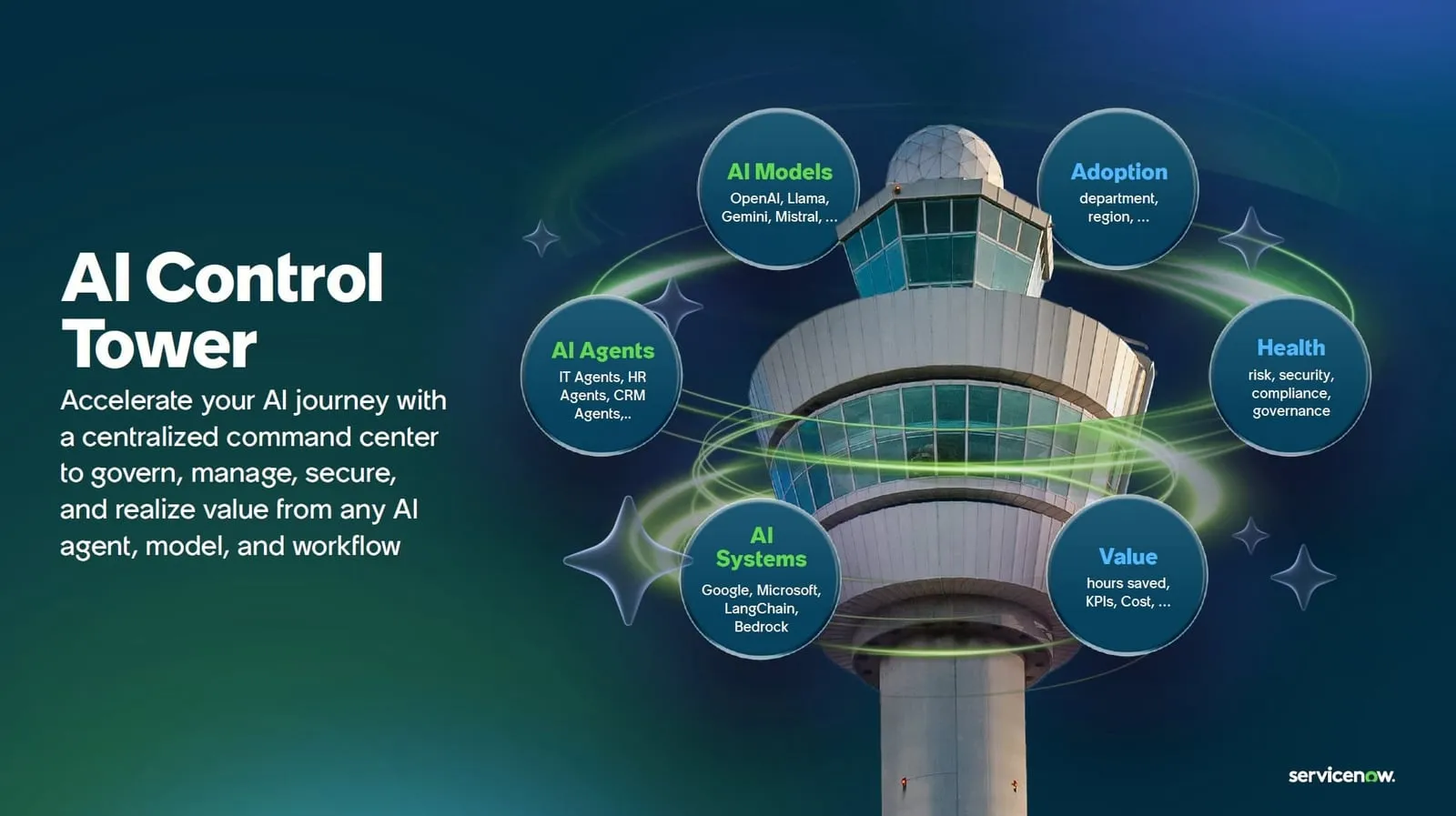
| Airport control tower | AI Control Tower |
|---|---|
| Knows which aircraft are present | Finds the AI in the company and puts it in one inventory |
| Clears aircraft for takeoff | Assesses risk and approves AI before it goes into use |
| Watches aircraft in flight | Monitors the quality, safety and permissions of running AI |
| Stops them when something is dangerous | Stops a problematic AI agent on the spot |
One thing an airport control tower does not do: AI Control Tower also counts what AI costs and what it delivers.
Why a product like this is needed
AI is starting to show up all over companies. Some of it runs inside ServiceNow, some is agents built in Copilot Studio, some is models running on AWS. Where each was built and which team owns it varies. The product documentation says that when no team has the full picture, unrecorded models and integrations become blind spots in risk management.
AI Control Tower was announced at Knowledge 2025 (ServiceNow’s annual event) on May 6, 2025, and became generally available the same day.
Terms to know first
| Term | Meaning |
|---|---|
| NIST AI RMF / EU AI Act | The AI risk management framework from the US NIST, and the EU law regulating AI. The product shows compliance with both as a score |
| AI assets | The AI recorded in the inventory. There are five kinds: AI systems, models, datasets, prompts and MCP servers |
| MCP server | The entry point an AI agent uses to reach external tools and data. MCP (Model Context Protocol) is the common standard for that connection |
| AI Gateway | One of AI Control Tower’s features. It puts connections to MCP servers under approval and monitoring |
| AI steward | The role responsible for governing all AI across the company |
| Assist | The unit ServiceNow uses to count AI usage |
What the five pillars do
At Knowledge 2026 in May 2026, ServiceNow announced it would expand AI Control Tower along five pillars. The expanded features were to be available to try in Innovation Lab in May, with general availability planned for August. What shipped is summarized in the overview of the August and September 2026 releases. Set against the control tower analogy, it looks like this.
| Pillar | Control tower equivalent | Main features |
|---|---|---|
| Discover | Knowing which aircraft are present | Connectors for AWS, Azure, Google Cloud, Salesforce, Anthropic, OpenAI, Microsoft Agent 365 and more |
| Govern | Clearing aircraft for takeoff | Risk assessments for any type of AI, controls aligned with NIST and the EU AI Act, configuration packs for regulations such as California’s, approval flows for changes and retirement |
| Observe | Watching aircraft in flight | Collecting execution records (traces) from external AI, LLM-based scoring of quality and safety for each run |
| Secure | Stopping them when something is dangerous | A map of agent permissions using Veza technology, importing results of model vulnerability tests, detecting and blocking attacks at runtime, a kill switch, AI Gateway |
| Measure | (no equivalent) | Adding up the cost of assists and third-party AI tokens, allocating it to departments and users, calculating return on investment |
When something goes wrong, the tool to reach for is the kill switch in the Secure pillar. It revokes the credentials of a problematic agent. Besides ServiceNow’s own agents, it can revoke them in Okta, GCP and AWS Bedrock. ServiceNow says containment time drops from about 30 minutes to seconds, and access can be restored afterward.
In the Measure pillar, allocating costs to departments and users is limited to Anthropic and ServiceNow AI agents.
Three ways AI gets into the inventory
Just as a control tower first needs to know which aircraft are present, AI Control Tower starts by collecting the company’s AI into an inventory. The inventory lives in ServiceNow’s CMDB (configuration management database), so AI is recorded in the same place as servers and applications. The product documentation overview lists three ways in.
- AI inside ServiceNow: Skills, models, prompts, datasets, agents and tools are synced to the inventory automatically
- AI in external clouds: AI in AWS Bedrock, Azure AI Foundry, Copilot Studio, Vertex AI and others is found through connectors
- MCP servers: Registering one adds it to the inventory, after which it can go through the approval flow
Anything not found automatically can be added by hand from the inventory screen.
Being in the inventory does not start monitoring
According to the overview of the June 2026 release, AI in the inventory has one of two states: Managed or Unmanaged. Approval flows, risk assessments, value measurement and monitoring run only for AI set to Managed.
In control tower terms, it is close to an aircraft that shows up on radar but gets no clearances or monitoring until it is registered for air traffic control. Only AI stewards can switch AI to Managed. Since the June release, you can create up to 10 automatic rules that periodically move matching AI to Managed. Up to 5 can be active at once, and 3 are provided out of the box.
For MCP servers, once the approval mechanism is enabled, unapproved servers no longer appear on the screen where agents are built.
Who does what
The documentation lists five roles. The administrator and the workspace administrator handle configuration; the three below are involved in day-to-day governance.
| Role | Responsibilities |
|---|---|
| AI steward | Looks across the whole inventory, checks quality and safety scores and the status of risk and regulatory compliance, and coordinates with AI owners |
| AI owner (product owner) | Keeps the records for their AI up to date, tracks value and usage, and responds to approval requests |
| Risk and compliance | Reviews risk classifications and regulatory compliance status, and manages risk assessments |
Required licenses and cost
Pricing for AI Control Tower is not public. The AI Gateway FAQ also tells readers to contact their account representative for pricing. Here is what the sources do say.
- AI Gateway is included in AI Control Tower Core and Pro Plus. It does not need to be bought separately, and its plugin (sn_awh_config) is installed automatically when AI Control Tower is set up
- The AI strategy tab on the home screen requires an SPM (Strategic Portfolio Management) Professional license (home screen documentation)
- IRM (Integrated Risk Management), ServiceNow’s risk management product, is not required (official community Welcome Guide)
- All three tiers of ServiceNow AI (Foundation, Advanced, Prime) include AI Control Tower with the same features. ServiceNow’s own AI can be handled from governance through measurement, but handling external AI the same way requires a separate AI Control Tower for Enterprise AI license (product tier documentation)
At Knowledge 2026, ServiceNow also announced it would provide AI Control Tower free for one year to companies adopting it. Fortune reports ServiceNow’s statement that this is worth $2 million.
When estimating cost, the cost of AI Control Tower alone is not enough. CIO reports that ServiceNow counts AI agent usage in “assists” and bills it on top of the contracted subscription. I covered how assists are counted in a separate post.
With Microsoft Agent 365, agent registrations can be shared
Microsoft’s Agent 365 is also a product for observing, governing and securing a company’s agents.
ServiceNow has added features to share agent registrations between the two products. The June release made it possible to publish ServiceNow agents that are Managed in AI Control Tower to the Agent 365 list. The August and September releases made it possible to discover and stop Agent 365 agents from AI Control Tower.
Maturity stages after rollout
The Welcome Guide describes four typical stages. It also says many organizations see results without going through every stage, so you can start from wherever you are.
- Crawl: Set up connectors and put ServiceNow and third-party AI into the inventory
- Walk: Enable approval flows and set up a first risk framework aligned with the EU AI Act or NIST AI RMF
- Run: Extend governance to external AI and start monitoring production agents
- Fly: Run continuous monitoring, value measurement and reporting for regulators
Right after installation, the charts on the home screen are empty. According to the documentation, chart data appears only after assessments are completed. Trend charts depend on a monthly collection job, and past data is imported by hand. An empty screen does not necessarily mean a configuration mistake.
What we don’t know
The following points were not covered in the sources I could check.
- Pricing: The product page would not open, and the FAQ points to the account representative. It is also unclear how Core and Pro Plus map to the higher tiers and the Enterprise AI license
- Terms of the free year: How to apply, when the period starts, and what happens from the second year
- Availability in Japanese: Whether the screens and documentation support Japanese
- Name: The AI Passport announcement on October 15, 2026 says “Super Intelligence Control Tower,” and CIO reports it as a new name. The product documentation still says “AI Control Tower,” and it is unclear whether feature and license names will change
Related notes
ServiceNowSecurity
ServiceNow AI Passport: AI agent permissions at runtime
ServiceNow AI Passport (announced October 15, 2026) gives each AI agent a signed credential checked at runtime. How it differs from AI Gateway, NVIDIA's role, and open questions.
7 min
AI
What is REA? 300,000+ GitHub stars and the real "two weeks"
REA, an MCP server giving reverse engineering tools to AI agents, drew GitHub stars fast in October. Star counts, repo dates, what Ghidra and others do, and a static Electron test.
7 min
ServiceNow
ServiceNow Four Zeros: adoption blueprints for autonomous IT
ServiceNow's "Four Zeros," posted October 19, 2026, is not a product but a guide to ordering ITSM, ITOM, and CMDB. The four goals, the phases and gates, and open questions.
9 min