What is the Copilot Studio skill catalog? What to settle before managing skill sharing
TL;DR
- The Microsoft 365 roadmap now lists a "skill catalog" in Copilot Studio, where makers can find and reuse approved skills and share them with chosen people
- Shared skills work across Copilot Studio, Microsoft 365 Copilot and Cowork. The catalog is backed by the Microsoft 365 App Store
- Preview is planned for September 2026 and general availability for October 2026, and the status is In development
- A skill is a reusable component made of a name, a description and instructions in Markdown. Today you build one per agent, or import a file to add one
- Before the catalog arrives, it helps to decide who approves skills and how to write names and descriptions
Contents (5)
The Microsoft 365 roadmap now lists a “skill catalog” for Copilot Studio. It lets makers (people who build agents) find and reuse skills approved by their organization, and share them only with chosen people.
The roadmap entry is short and doesn’t yet describe screens or operations. Below, I separate what the roadmap says from how Microsoft Learn currently describes skills.
What the roadmap says
The roadmap entry says the following.
- Makers can find and reuse approved skills from within the organization, and selectively share them, instead of recreating the same instructions and procedures for each agent
- The shared catalog is backed by the Microsoft 365 App Store. Shared skills work across Copilot Studio, Microsoft 365 Copilot and Cowork
- Organizations can standardize proven ways of working while keeping management centralized
- Preview is planned for September 2026 and general availability for October 2026. The status is “In development”, covering the web and standard worldwide tenants
The roadmap doesn’t describe the catalog’s screens, the approval flow, admin settings, or any effect on licensing or billing. Plans may change.
What a skill is
According to Microsoft Learn’s overview, a skill is a capability defined by a name, a description and instructions written in Markdown. It can also bundle scripts, reference material and templates.
When a user’s request matches a skill’s purpose, the orchestration runtime calls the skill. It decides based on the user’s message and the skill’s description. That makes how you write the description directly affect how often the skill gets called.
Learn distinguishes skills from other components like this.
- Instructions: the behavior and personality of the agent as a whole
- Knowledge: data the agent refers to
- Tools: operating external services through connectors, APIs and MCP servers
- Skills: reusable capabilities for a particular kind of work, managed as Markdown-based files or packages
Skills follow an open specification and are described as loading only the information needed, when it is needed. Note that the skill descriptions I could confirm within the scope of this article are for agents and workflows that run on the GitHub Copilot harness. The roadmap doesn’t say which harness the catalog will support.
How skills are built today
Before the catalog, you add skills agent by agent. Learn lists three methods.
- Generate a skill: describe the skill you want in plain language, and Copilot builds it while asking you questions
- Build from scratch: write the name, description and instructions yourself. The name can use only lowercase letters, numbers and hyphens
- Import a file: upload a
SKILL.md, or a ZIP file that containsSKILL.md
With the generate method, the skill appears in the chat, and you can choose to view it, save it locally or add it to the agent.
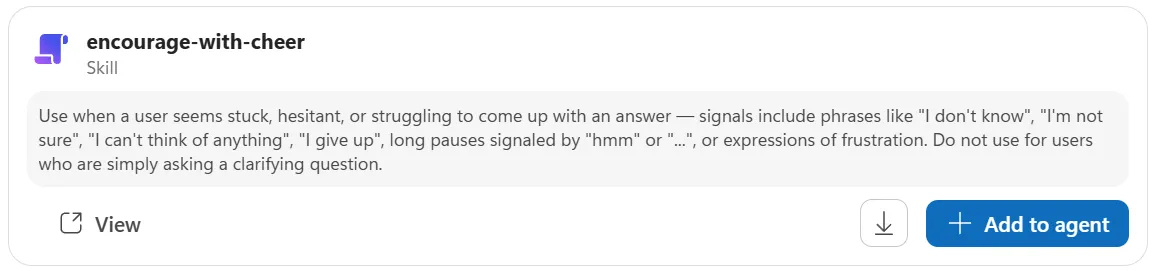
Added skills are listed under “Skills” in the agent’s “Build” tab. A skill can be downloaded as a Markdown file, which you can use to hand it to someone else or as a backup. The page on importing also lists browsing a skill catalog as one way to add a skill. But the only procedure it describes is importing a file.
The page also says that operations such as using, creating, testing and evaluating skills may consume Copilot Credits.
An existing mechanism to learn from: managing plugins in Cowork
How catalog approval and sharing will work hasn’t been published. But plugins for Cowork, which are distributed through the same Microsoft 365 App Store, already have management mechanisms. According to Microsoft Learn, a plugin is a package that can contain skills and connectors, in the same Microsoft 365 app package format as Teams apps. Managing them requires the Tenant Admin or Copilot Admin role, and users need a Microsoft 365 Copilot license.
The catalog isn’t said to use the same mechanism, so read this only as an example of operations that are already visible.
- Types of distribution: if an admin deploys to the whole organization or to specific groups, target users receive it automatically and can’t remove it. It shows “Managed by your organization”. If it is only placed in the App Store, users get it themselves and can remove it
- Allow and block: in the admin center under Agents > Tools, you can choose to make it available to everyone, make it available to specific users or groups only, or block it. You can’t narrow by country or region, so security groups stand in for that
- Publishing to the whole organization requires approval: when a user asks to publish their own plugin to the whole organization, it isn’t published until a tenant admin approves it. If rejected, it stays unavailable to others
- Sharing with specific people needs no approval: this approval applies only to organization-wide publishing. Sharing with people the user chooses can’t be stopped, and there is no tenant setting to disable sharing wholesale. You can block it or make it private afterward
- How blocking works: when blocked, everyone in the tenant can no longer use it, including people it was shared with. It takes effect from new conversations, and conversations in progress continue until they end
- Scope of permissions: sharing a plugin doesn’t give recipients new access rights. Connectors don’t work until the recipient signs in or consents themselves
- Auditing: plugin operations are recorded in Microsoft Purview audit logs under “Copilot activities”
- Limits: Microsoft Purview Information Barriers doesn’t support managing or sharing plugins and skills. In tenants where it is enabled, embedding knowledge files is blocked tenant-wide
Cowork also has “custom skills” that users place in OneDrive (written as SKILL.md with a name, description and instructions). The roadmap doesn’t say whether the catalog’s “selective sharing” covers both this kind of user-initiated sharing and what admins deploy, or only one of them.
What to decide before the catalog arrives
What follows is my own sorting from the roadmap and Learn. When the catalog’s specification is published, some of it may no longer fit.
- Who approves: as the phrase “approved skills” suggests, the catalog has a notion of approval. Who approves, and what they check, hasn’t been published. With Cowork plugins, a tenant admin approves organization-wide publishing, so it is easier to prepare if you assume someone in the same role for skills. If you decide ahead of time in your own organization, you could include the content of the instructions, the tools and materials referenced, and the scope of data handled as approval criteria
- How to name and describe: skills are called based on their description, so a vague description gets a skill confused with another or never used. Names are limited to lowercase letters, numbers and hyphens, so a naming rule such as
department-purposemakes skills easier to find - Scope of sharing: the catalog is said to allow “selective sharing”. Deciding in advance where to draw the line between skills used inside one department and skills released company-wide keeps sharing decisions consistent
- Reach into Cowork: it says shared skills can be used not only in Copilot Studio but also in Microsoft 365 Copilot and Cowork. A skill you built as a component for an agent may be called in other situations. It is safer to write it from the start so that it is fine in any setting
- Inventory of existing skills: if you are already building skills agent by agent, sorting out duplicates and near-duplicates in advance avoids confusion when you move them to the catalog
Changelog
- Checked the management of plugins for Cowork, which are distributed through the same Microsoft 365 App Store (Microsoft Learn), and added the existing mechanisms for approval, sharing, blocking and auditing
Spotted an error or something out of date? Let me know on X.
Related notes
Microsoft 365
Work IQ roadmap: approvals, agent policy, live transcripts
Timing for Work IQ's Human in the loop, Agent Policy Governance and Real Time Transcripts, compared with today's tenant-wide policy, Copilot Studio approvals and Teams APIs.
7 min
Microsoft 365
Copilot in SharePoint goes GA: what changes, where it helps
Copilot in SharePoint reaches general availability: how it differs from earlier SharePoint, the license versus Copilot Credits line, where it helps, and what to review first.
9 min
Microsoft 365AI
Copilot's Home, Code and Autopilot: roles, pricing, rollout
Microsoft's Copilot reorganization (Home / Code / Autopilot) by role, pricing and rollout schedule, with governance questions for large enterprises.
6 min