Work IQ roadmap: approvals, agent policy, live transcripts
TL;DR
- Three new Work IQ features appeared on the Microsoft 365 Roadmap, dated October 19, 2026. All are in development, and each gets a one-sentence description
- Human in the loop and Agent Policy Governance are scheduled for preview in November 2026 and general availability in January 2027
- Real Time Transcripts passes Teams meeting transcripts to apps and agents during the meeting. Its planned preview month of September has passed, but the status is still in development
- Today's Work IQ MCP policy is a single tenant-wide on/off switch. Per-user, per-app and per-agent settings are not in the first release
- Teams transcripts available through the Graph API can be fetched only after the meeting ends. The roadmap says nothing about the permissions for live delivery or whether admin settings can block it
Contents (7)
- The three features and their timing
- How Work IQ connects, and how it is billed
- Human in the loop vs. Copilot Studio’s Request for information
- Agent Policy Governance: how it differs from today’s policy
- Real Time Transcripts: transcripts reach agents during the meeting
- What admins should decide first
- What I couldn’t find
On October 19, 2026, three Work IQ features were added to the Microsoft 365 Roadmap. The first, “Human in the loop,” pauses an agent until a person approves. The second, “Agent Policy Governance,” lets admins control agents through policy. The third, “Real Time Transcripts,” passes Teams meeting transcripts along while the meeting is still running.
Each roadmap entry is a single sentence. So I lined them up against what Work IQ, Copilot Studio and the Teams APIs can already do, to see what is likely to change and what admins should decide in advance.
The three features and their timing
| Feature | Roadmap description | Preview | General availability |
|---|---|---|---|
| Human in the loop | Agents and agent flows pause and wait for human input or approval before continuing | November 2026 | January 2027 |
| Agent Policy Governance | Admins govern agents and their capabilities at scale through policy | November 2026 | January 2027 |
| Real Time Transcripts | Apps and agents access Teams meeting transcripts in real time for assistance and analysis | September 2026 | November 2026 |
All three have the status “In development,” and the only cloud listed is “Worldwide (Standard Multi-Tenant).” Real Time Transcripts is still in development even though its planned preview month, September, has passed.
Other Work IQ items also reached the roadmap in October. One of them, “A2A and MCP elicitation,” lets an A2A or MCP task pause to ask for missing information or authorization and then resume. Its preview is planned for October. Pausing to ask a person looks set to arrive in A2A and MCP tasks before Human in the loop does.
How Work IQ connects, and how it is billed
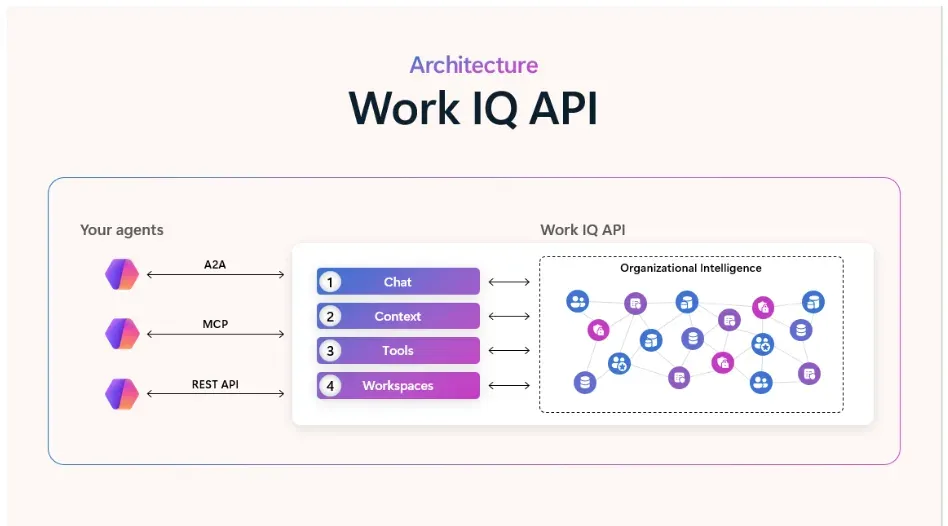
According to the Microsoft Learn overview, Work IQ is the foundation that lets agents use an organization’s data, context and tools. It offers three connection methods: A2A, a remote MCP server and a REST API. Work IQ MCP folds hundreds of operations into 10 general-purpose tools. Each call combines a verb such as fetch or create with a resource path such as /me/messages to work with mail, calendars, files, chats and more.
Work IQ API usage is billed by consumption, separately from Microsoft 365 Copilot licenses. Even for users who hold a Copilot license, use through custom or third-party agents is metered. Work IQ (preview) in Copilot Studio runs on the GitHub Copilot harness and consumes Copilot Credits. I covered billing as a whole in an article that sorts Copilot charges by case.
Human in the loop vs. Copilot Studio’s Request for information
Copilot Studio agent flows can already pause to ask a person for input, using “Request for information.” It stops the run, collects input from the people you specify, and makes those values available to later steps. However, requests arrive only as Outlook email and cannot go to people outside the tenant. If there are several recipients, only the first response is used. Inputs come in five types: text, yes/no, email address, number and date.
That page covers agent flows running on the standard harness. Agents in Copilot Studio that use Work IQ (preview), on the other hand, run on the GitHub Copilot harness. The Copilot Studio Work IQ page says that Work IQ and the traditional individual tools, such as email and Teams, differ in both how they run and how they are billed.
Work IQ’s Human in the loop targets “agents and agent flows.” Reading the roadmap, it seems that agents themselves, not only steps inside a flow, will be able to stop and wait for approval. Where approval requests will arrive (Outlook, Teams or the Copilot interface) and whether Request for information’s limits will carry over have not been stated.
Agent Policy Governance: how it differs from today’s policy
Work IQ MCP already has a policy layer. According to the Microsoft Learn policy page, rules written in Open Policy Agent’s Rego decide whether each MCP tool request is allowed or denied. The inputs are the resource path, the operation type, the request content, and the user and tenant context. Operation types include read, create, delete and action, among others.
This policy does not replace Entra authentication, OAuth permissions or the user’s Microsoft 365 permissions. It is an extra layer on top of them. Even when policy allows a request, it fails if the user lacks permission to the data.
Admins should know three default behaviors:
- Operations that change data (create, update, delete, sending mail and so on) are not allowed by default
- The setting is switched in the Microsoft 365 admin center under Agents > Tools, on the Work IQ MCP Policies tab. Changes can take up to 24 hours to apply
- The first release only turns the policy on or off for the whole tenant. Per-user, per-app or per-agent settings and scenario-based templates are not included
On finer-grained control and templates, Learn says they may be added later depending on feedback and usage. Agent Policy Governance is described as “admin controls to govern agents and their capabilities at scale through policy.” That reads as widening the unit of control from MCP requests to agents, but it is not stated whether it refines today’s tenant-wide policy or is a separate mechanism. Copilot Studio’s Learn page also describes the Agent 365 control plane as observing and governing agent actions.
Real Time Transcripts: transcripts reach agents during the meeting
Teams transcripts can already be retrieved through the Microsoft Graph API. But the Teams developer documentation describes retrieval after a meeting or call ends. An app receives a meeting notification and fetches the transcript once the meeting is over and the transcript is ready.
Permissions are either application permissions that apply across the tenant or resource-specific consent (RSC) per meeting. On top of that, tenant admins have two settings. If “Graph API access to transcripts” is disabled, every transcript request returns 403 Forbidden. If “Speaker attribution” is disabled, transcripts come back without speaker information.
With Real Time Transcripts, the transcript reaches apps and agents partway through the meeting. Unlike reading it afterward, what people say enters an agent’s processing on the spot. The roadmap does not say whether the two settings above also apply to the Work IQ path.
What admins should decide first
Details for all three will probably come around preview time. Still, the following can likely be decided from the current specs.
- How far to allow writes. Today’s Work IQ MCP is read-only by default. Once Human in the loop arrives, you may be able to split things as “allow writes only for operations that go through approval.” It is worth listing, per business process, which operations, such as sending mail or creating calendar events, should require approval
- Whether you need per-agent controls. Today’s policy is tenant-wide only. If you need to separate controls by department or agent, check in the Agent Policy Governance preview whether settings work at that level
- Who gets live transcripts. Check how the two current Graph API settings are configured, and decide how to tell participants that transcripts are passed along during the meeting. That should make trying the preview more straightforward
- Spending limits. Copilot Studio’s Learn page says Work IQ usage requires a separate spending policy. Decide how to set limits before rolling agents out more widely
What I couldn’t find
Besides the roadmap and Microsoft Learn, I also searched the June Work IQ API announcement, the October developer blog and Microsoft’s Inside Track. Beyond the points noted in each section, I found nothing on licensing and billing for the three features, how approvers are chosen, how Agent Policy Governance relates to Agent 365, the permissions for Real Time Transcripts, or availability in clouds other than Worldwide (such as government clouds).
Related notes
Microsoft 365
What is the Copilot Studio skill catalog? What to settle before managing skill sharing
The Copilot Studio skill catalog on the Microsoft 365 roadmap: what is known, how skills are built today, and what to settle before sharing skills across an organization.
6 min
Microsoft 365
Copilot in SharePoint goes GA: what changes, where it helps
Copilot in SharePoint reaches general availability: how it differs from earlier SharePoint, the license versus Copilot Credits line, where it helps, and what to review first.
9 min
Microsoft 365AI
Copilot's Home, Code and Autopilot: roles, pricing, rollout
Microsoft's Copilot reorganization (Home / Code / Autopilot) by role, pricing and rollout schedule, with governance questions for large enterprises.
6 min