Microsoft 365 Copilot: what's flat-rate, what's metered?
TL;DR
- Microsoft splits Copilot billing in two: everyday AI work is covered by a per-user monthly license, and advanced work you hand off entirely is metered through Copilot Credits
- Metered features include Cowork, Code, Autopilot, the new advanced SharePoint features, and frontier models such as Fable and Astra. Using them requires a monthly license
- Metered billing without a license is a separate mechanism, covering Copilot Chat, SharePoint agents and others
- For Enterprise, metered features can't be used and no charges occur until an admin creates a spending policy. For new Copilot Business purchases through CSP, metered billing is enabled by default from November 2, 2026
Contents (9)
- The big picture: everyday AI and advanced AI
- Sorted by case
- A: What you can use at a flat rate
- B: What uses Copilot Credits on top of the monthly license
- C: Metered billing without a license
- D: New Copilot Business has metered billing on by default
- The cost comparison Microsoft showed
- What admins see, and what doesn’t happen
- Points to inventory before deploying
On September 25, 2026, Microsoft announced it would “evolve” the Copilot pricing model. It has two tiers: everyday AI work stays flat-rate as before, and advanced AI work is billed by usage. But reading the announcement, it isn’t easy to tell at a glance whether a given feature is covered by the flat rate or uses Copilot Credits, so I sorted out the metered billing mechanisms based on Microsoft Learn.
The big picture: everyday AI and advanced AI
Microsoft splits AI work in two and assigns each a different way of paying.
- Everyday AI: AI for every employee, such as summarizing meetings, drafting documents and analysis. Covered by the per-user monthly license
- Advanced AI: work that people hand off entirely, such as agents that run for hours and unsupervised workflows. Billed by usage, and consumes Copilot Credits
The official blog explains why everyday AI is flat-rate: “if there were a meter on every task, companies would hold back use and only some people would get to use AI”. In the same blog’s terms, the monthly license is the “battery” and metered billing is the “fuel tank”.
Metered billing is layered on top of the monthly license. Using a metered feature also requires a monthly license, so you can’t contract for metered billing alone.
Microsoft’s materials abbreviate the monthly license as USL (User Subscription License) and Credits-based metered billing as UBB (Usage-Based Billing). (This article doesn’t use USL and UBB, and calls them the monthly license and metered billing.)
Sorted by case
Billing by feature falls into the following four cases.
| Case | Billing | Main examples |
|---|---|---|
| A | Flat rate (included in the monthly license) | Copilot Chat, Copilot in Word, Excel and PowerPoint, Auto, choosing GPT-5.6 or Sonnet 5 |
| B | Metered (Copilot Credits) on top of the monthly license | Cowork, Code, Autopilot, the new advanced SharePoint features, frontier models such as Fable and Astra, the Work IQ API |
| C | Metered without a license | Copilot Chat (for users without a license), SharePoint agents, the Copilot Retrieval API (preview) |
| D | New contracts with metered billing by default | New Microsoft 365 Copilot Business bought through CSP from November 2, 2026 |
A: What you can use at a flat rate
What the monthly license includes is everyday AI work. The official blog lists Copilot Chat and Copilot in Word, Excel and PowerPoint. For models, the basic choice is “Auto”, which picks the best model and reasoning depth for each request based on accuracy, speed and cost, but you can also choose yourself.
- GPT-5.6 and Sonnet 5 are included in the monthly license within fair use
- Newer models such as Opus 5 are included in the monthly license with a cap
The monthly license has always had a fair-use cap, and Microsoft says it sets it so that the great majority of people don’t reach it. When you approach the cap, a notification appears, and you can choose to switch to Auto and continue at no extra cost, or move to Credits. Microsoft Learn lists this notification as “coming soon”, so as of September 29, 2026 it isn’t available yet.
B: What uses Copilot Credits on top of the monthly license
These features consume Copilot Credits.
- Cowork, Code and Autopilot
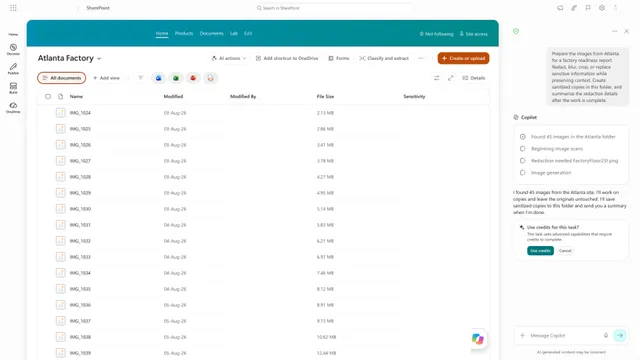
- The new advanced SharePoint features. As I sorted out in an earlier article, these cover processing across large volumes of content, agent work that moves through multiple steps on its own, image generation and editing, AI-generated site analysis reports, and near-real-time automatic metadata filling (article on Copilot in SharePoint)
- Work that uses frontier models such as Fable and Astra
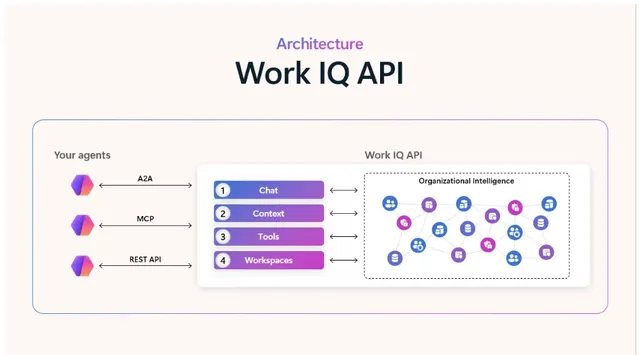
- The Work IQ API (for third-party agents) and apps built in Cowork
The charge is “in addition to the monthly license”, not “instead of” it. The Register’s article also describes this as “a meter attached”. The article explains that consumption varies with the model used, how much context is loaded, how long the task runs and which tools are called. The longer a task runs through multiple steps, the more Credits it consumes. The unit price of Copilot Credits, and the general start date of the new billing, weren’t in the official information I checked.
Microsoft also writes that a feature that is metered today may move into the monthly license if costs fall. It may also first come into the monthly license with a cap.
C: Metered billing without a license
The other metered billing is for use without buying a license, which Microsoft’s materials call PAYG (pay-as-you-go). In Microsoft Learn, it covers Copilot Chat, SharePoint agents and the Microsoft Copilot Retrieval API (preview), and is metered through an Azure subscription. PAYG for Copilot Studio is described on a separate page.
The differences from Credits-based metered billing are as follows.
| Credits-based metered billing | Metered billing without a license | |
|---|---|---|
| Monthly license | Required | Not required (usable without a license) |
| Unit of billing | Copilot Credits | Azure meters |
| Where you manage it | Copilot > Cost management in the Microsoft 365 admin center (spending policies) | Billing policy in the admin center |
Microsoft Learn also describes these two on separate pages. When you look into billing for “Copilot Chat” or “SharePoint agents”, you need to read the page on metered billing without a license (PAYG).
D: New Copilot Business has metered billing on by default
For new Microsoft 365 Copilot Business bought through CSP (Cloud Solution Provider) from November 2, 2026, metered billing is on by default. According to the Partner Center notice, the purpose is to let customers use metered features such as Copilot Cowork, the Work IQ API and the GitHub Copilot Harness with less billing setup. The notice also mentions a “preconfigured monthly cap”, and partners are asked to prepare to explain this cap to customers. The cap amount wasn’t on the official pages I checked.
This applies to new purchases through CSP. What happens to existing contracts, or contracts bought outside CSP, wasn’t clear from the information I checked.
The cost comparison Microsoft showed
The official blog includes a cost comparison chart that Microsoft made itself.
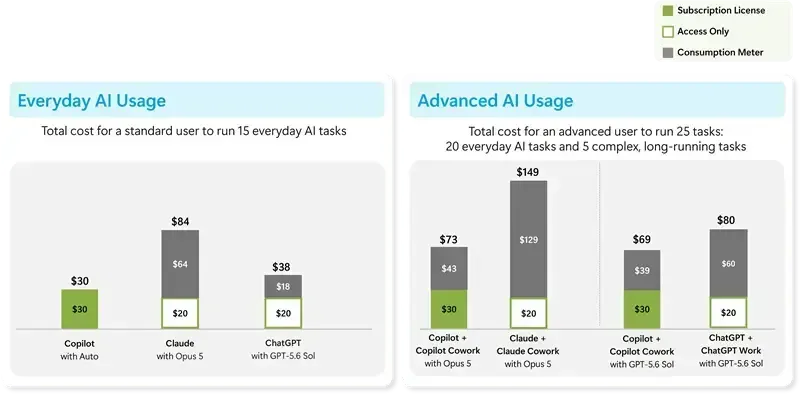
The chart means the following.
- For everyday work, Copilot costs only the $30 subscription, while other companies’ models add a metered portion
- For advanced work, Copilot also adds Cowork’s metered portion ($39 to $43) to the $30 monthly license, for a total of $69 to $73
This is Microsoft comparing, on a profile it assumed, against competitors’ published prices and API rates. The blog’s note says it excludes discounts and negotiated prices, and that actual results vary with how it is used. For your own decision you need an estimate based on your own usage. For Cowork usage, the official documentation points to the Copilot Credit Estimator.
What admins see, and what doesn’t happen
For Enterprise, the official blog explains that metered features appear in the product but can’t be used until an admin creates a spending policy in the Microsoft 365 admin center, and nothing is charged before that.
According to Microsoft Learn, a spending policy lets you do the following.
- Limit the policy to all users or specific security groups
- Set monthly caps at the tenant level and the user level
- Send notifications to admins and users as a cap approaches
- Choose the billing method: metered billing (through an Azure subscription), a prepurchase plan for Copilot Credits (P3), existing prepaid capacity packs and others
- Set the approval route for additional requests from users nearing their cap
Two points to watch.
- The “automatically apply new services” setting is enabled by default. Services and agents that become eligible later are automatically added to existing policies. For a policy where you want to review manually before adding, turn it off
- Additional policies don’t inherit the tenant-wide cap. Each policy has its own independent cap
The range of features under management isn’t consistent across the official information in timing. The official blog says Cost management covers Code and Managed Runtime in addition to Cowork and the Work IQ API, and that Copilot Studio agents are added in October. On the other hand, some places on Microsoft Learn’s management pages say it covers Cowork and the Work IQ API. The documentation may not have caught up, so the sure way to know what is actually covered in your own tenant is to check in the admin center.
Points to inventory before deploying
What follows is my own sorting, based on the official information.
- Which case a feature falls into: sort the features you plan to use into A through C. Only those that fall under B or C create extra cost. If you are buying Copilot Business new through CSP, also check the conditions for D
- Who is allowed to use it: metered billing requires a monthly license, and Microsoft Learn writes that Credits may be better held by the business department. Deciding which department bears the cost, separately from the monthly license IT distributes company-wide, makes later coordination easier
- Where to put caps and notifications: per-user caps are optional, but Microsoft Learn recommends checking settings so that one person can’t use up all the Credits. Notification recipients can also be set at the initial configuration
- Whether to turn off automatic policy application: decide whether the scope of cost may widen every time a new feature is added
- Whether metered billing without a license is running: if you enabled it in the past for Copilot Chat or SharePoint agents, a billing policy separate from Credits remains. Check the Billing side of the admin center too
- Whether you plan to buy Copilot Business new through CSP: from November 2, the configuration will have metered billing on by default. Confirm the monthly cap value with your reseller before buying
Related notes
Microsoft 365
Copilot in SharePoint goes GA: what changes, where it helps
Copilot in SharePoint reaches general availability: how it differs from earlier SharePoint, the license versus Copilot Credits line, where it helps, and what to review first.
9 min
Microsoft 365
Work IQ roadmap: approvals, agent policy, live transcripts
Timing for Work IQ's Human in the loop, Agent Policy Governance and Real Time Transcripts, compared with today's tenant-wide policy, Copilot Studio approvals and Teams APIs.
7 min
Microsoft 365
Fujitsu's 90%+ Copilot usage: lessons for AI adoption
Fujitsu expanded Microsoft 365 Copilot to about 100,000 licenses and reports a usage rate above 90%. What the case suggests about driving generative AI adoption at a company.
8 min