Fujitsu's 90%+ Copilot usage: lessons for AI adoption
TL;DR
- Fujitsu grew Microsoft 365 Copilot from a 7,500-license trial in July 2025 to 30,000 licenses in January 2026 and about 100,000 in April 2026
- Its adoption measures: the company-wide network of its transformation program, training materials by skill level, awards for use cases, and knowledge-sharing sessions for heavy users
- The admin center usage rate counts anyone who used a Copilot feature at least once in the period. Viva Insights lets you change the bar, for example to at least one day a week
- When comparing with your own company, align three things: the period, the definition of use, and the denominator (licenses or employees)
Contents (6)
According to a Fujitsu customer story (in Japanese) that Microsoft Japan published on September 4, 2026, Fujitsu has expanded Microsoft 365 Copilot to about 100,000 licenses, covering nearly all of its employees. As of June 2026, the usage rate has stayed above 90%. On October 8, the Japanese IT news site @IT covered the case from the angle of how Fujitsu avoided the “we deployed it but nobody uses it” problem.
From 7,500 to 100,000 in three steps over nine months
The customer story describes the rollout in this order.
| When | Licenses | What happened |
|---|---|---|
| July 2025 | 7,500 | Intensive trial covering every division of the company |
| January 2026 | 30,000 | Expanded based on the trial results |
| April 2026 | About 100,000 | Full deployment to nearly all employees, including overseas |
| June 2026 | About 100,000 | Usage rate maintained above 90% |
The published materials do not define the period, the definition of use, or the denominator behind this 90%+ usage rate.
Masayuki Wada of the Corporate Digital Division explains that the trial started at 7,500 people because of “the size of the impact we could get.” Writing meeting minutes and documents is work every department does, but if only a few people use the tool, the situations where it gets used stay limited and the benefit can’t be maximized.
On how to judge cost-effectiveness, Shunsuke Sawamura of the CEO Office says the team spent the trial considering what kind of ROI to set. With backing from senior management, they came to see that the important thing was to deploy quickly first and judge the value while using it themselves. In other words, they chose to expand and measure along the way rather than fix detailed KPIs up front.
Fujitsu chose Copilot because it ties into Teams and Outlook, which the company already used internally, so employees could use it directly in their daily work.
What Fujitsu put in place to make it stick
According to the customer story and the @IT article, Fujitsu prepared four things to make usage stick: a support structure, training materials, awards, and forums for advanced users.
For the support structure, it used the company-wide network of “Fujitora” (Fujitsu Transformation), an internal transformation program running since 2020. On top of that, it launched a cross-divisional “Company-wide AI Practice Initiative.” For training, it created hands-on seminars and training videos during the trial so people could learn according to their skill level.
The awards are the “AI & DDM Award,” for improvements to business systems, and the “Teppan Agent Contest” (teppan roughly means “tried-and-true”), for uses of AI agents. Both are held regularly. For heavy users, Fujitsu also set up places to build skills, such as knowledge-sharing sessions run by core members of Fujitora.
Sawamura says the aim was not monotonous training but measures that lead to better ways of using the tool. Microsoft Japan supported the content production and event operations.
A December 2025 post on Fujitsu’s PR blog on note (in Japanese) adds detail on the support structure. “AI Task Force,” a community for employees to use AI on their own initiative, has about 1,400 members from 350 organizations. Each division’s DX Officer (DXO) coordinates activities across divisions. The post also states a KGI of raising company-wide productivity to 1.4 times its current level.
Sawamura cites encouragement from senior management as a reason the company-wide rollout moved quickly, and says the company-wide network built through Fujitora helped AI adoption go smoothly.
The admin center’s “usage rate” counts one use
When admins pull their own numbers, most start with the usage reports in the Microsoft 365 admin center. Microsoft Learn’s description of the report defines three numbers as follows.
| Metric | Definition |
|---|---|
| Enabled Users | The number of users who had a Copilot license during the period |
| Active Users | Of those, the number who tried a user-initiated Copilot feature in at least one app during the period |
| Active users rate | Active Users divided by Enabled Users |
There are four periods: the last 7, 28, 90, and 180 days. A day’s usage usually appears in the report within 48 hours of the end of that day (UTC). To open it, go to Reports > Usage in the admin center, then Microsoft Copilot > Copilot, and select the Usage tab. User names, display names, groups, and site information are hidden by default.
Under this definition, asking Word for a summary once in 28 days counts you as an Active User. A 90% measured over 28 days and a 90% measured over 7 days are both “90%,” but they mean different things. Also, the per-user table includes everyone who held a license at any point in the past 180 days. It lists people whose licenses were removed and people who never used Copilot, so its population differs from Enabled Users when the period is set to 28 days.
Recounting users from Microsoft Purview audit logs is not a supported use. The same page says audit logs are security and compliance data, and that an “active user count” built from them may not match the official report.
Use Viva Insights to tell whether it’s a habit
Whether someone used Copilot once doesn’t tell you whether it stuck. Viva Insights has the features for splitting users by how often they use it.
To use the Copilot Dashboard in a tenant, you need a Microsoft 365 or Office 365 business subscription and Exchange Online accounts. A paid Viva Insights license is not required. Out of the box, only Global Administrators and a subset of top leaders, identified from manager information in Entra ID, can see it. Anyone else needs access to be configured or delegated.
The analysis covers all employees assigned a Copilot license, and if the tenant has at least one Copilot license, Copilot Chat usage by unlicensed people is included too. Tenants with 1–49 Copilot licenses still get tenant-level and group-level metrics. Tenants with 50 or more (or 50 or more Viva Insights licenses) also get benchmarks, agent analysis, and group views and delegation for managers, among other features. Even though the definition of use matches the admin center report, the population and period can differ, so the two numbers won’t necessarily match.
For a finer view, use the analyst-facing Copilot adoption report in Viva Insights. It requires the Insights Analyst role and Power BI Desktop, plus a Copilot or Viva Insights license assigned to the employees you want to include. It counts a day with at least one Copilot action as an “active day,” and you can choose the bar for an active user from three options: “at least 1 day in the selected period,” “at least 1 day every 4 weeks,” and “at least 1 day every week.”
It also classifies users by frequency. With the default settings, someone who used Copilot in at least 9 of the last 12 weeks and averaged 15 or more actions a week is a “Power user.” Someone with the same 9 or more weeks but 1–14 actions a week on average is a “Habitual user.” Someone who used it at least once in 12 weeks but in fewer than 9 weeks is a “Novice user.” You can also change the aggregation window to 4 weeks, and the Power user definition is adjustable in the settings. If the “90%” were the share of people who used Copilot even once, how many of them are Novice users would make a big difference to how well it has actually stuck.
What Fujitsu wants to measure after usage rate
Fujitsu itself doesn’t rely on usage rate alone to describe the impact. The result with concrete numbers in the customer story is the internal service desk. AI agents handle first response and triage, and about 75% of a process that handles about 300,000 inquiries a year has been automated. Staff can now work on improving the FAQs and procedure documents the AI agents base their answers on, and on raising answer accuracy. The company says it is also redesigning core business processes such as sales, SE (systems engineering), procurement, and finance and accounting on the assumption of AI. The approach of bringing AI into internal work first is also covered in a post on the Airbnb case.
Features that let Copilot read internal documents such as FAQs and procedures and act on them are covered in a post on Copilot in SharePoint going GA.
On measuring impact, Wada has started an effort that uses Fujitsu’s causal analysis technology to define intermediate factors between the introduction of AI tools and financial results, then turn those factors into KPIs to make the impact visible. The customer story does not say what the intermediate factors are.
Fujitsu’s goal is a “multi-agent system.” Copilot becomes the front door to work and connects to business-specific AI agents from Fujitsu and other companies, and to business systems such as ERP and CRM. Once it gets to that stage, what gets measured will likely shift from usage rate to which work has been automated, and by how much.
Comparing with your own numbers
When you put Fujitsu’s 90% next to your own number, decide three things on your side first: the period, the definition of use, and the denominator. That makes the comparison easier to explain. Just noting the bar, such as “used at least once in 28 days” if you take the admin center figure as is, or “at least 1 day every week in Viva Insights” if you want to see whether it stuck, is enough to convey what the number means.
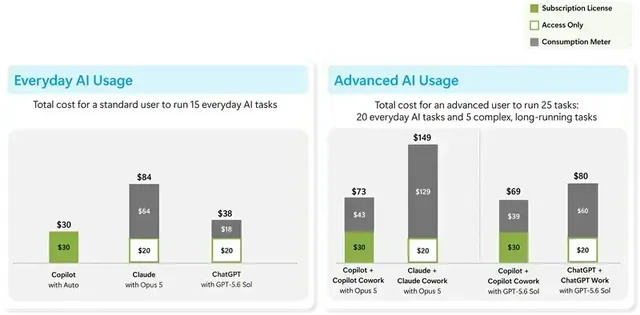
On cost, a high usage rate and predictable spending are separate questions. I covered how the monthly license and metered billing split in a post sorting Copilot billing by case.
Related notes
Microsoft 365
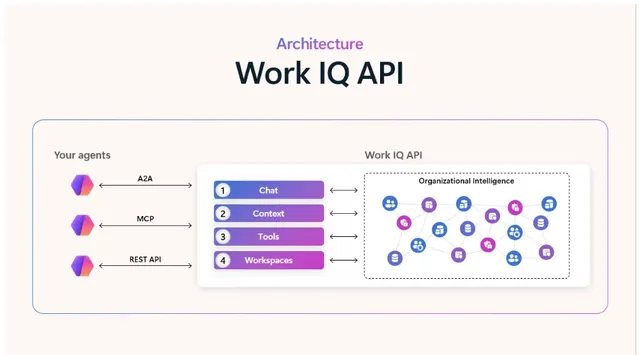
Work IQ roadmap: approvals, agent policy, live transcripts
Timing for Work IQ's Human in the loop, Agent Policy Governance and Real Time Transcripts, compared with today's tenant-wide policy, Copilot Studio approvals and Teams APIs.
7 min
Microsoft 365
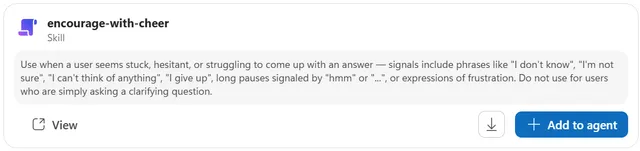
What is the Copilot Studio skill catalog? What to settle before managing skill sharing
The Copilot Studio skill catalog on the Microsoft 365 roadmap: what is known, how skills are built today, and what to settle before sharing skills across an organization.
6 min
Microsoft 365
Microsoft 365 Copilot: what's flat-rate, what's metered?
Microsoft's new Copilot billing model by case: what the monthly license covers, what uses Copilot Credits, and what is metered without a license, plus a pre-deployment inventory.
8 min