ServiceNow Brazil release date (GA Nov 2026) and key changes
TL;DR
- Brazil entered Early Availability (EA) on September 24, 2026, and General Availability (GA) is planned for November 2026
- On the AI side, the user-facing experience across Now Assist, Moveworks and AI Experience is being reorganized around the "ServiceNow Otto" brand
- On the UI side, a new AI-native framework called "Lux" arrives, rolling out in stages from Q4 2026
- For developers there are enhancements to Build Agent, Autonomous Engineer, ServiceNow Studio and more
- In HRSD, HR tasks, employee journeys, and e-signatures can be handled inside EmployeeWorks. Much of this ships as ServiceNow Store apps, and three features, including the HRSD Process Mining Content Pack, are deprecated
Contents (9)
Early Availability (EA) of ServiceNow’s next family release, “Brazil”, has begun.
The main changes are the AI experience brand “ServiceNow Otto”, a new UI framework “Lux”, and developer features such as Build Agent. Brazil GA is planned for November 2026, and the timing of the Lux rollout and the conditions for using the AI features need to be checked individually.
Release dates
| Item | Timing |
|---|---|
| Early Availability (EA) | September 24, 2026 |
| General Availability (GA) | Planned for November 2026 |
Ahead of EA, the “Developer Passport” advance sessions for developers were held from September 14 to 18.
Brazil is also available on PDIs (Personal Developer Instances) from September 24. You can create a Brazil PDI without a ticket, so you can check new features and the effect on your existing customizations before upgrading a production instance.
Key changes to watch in Brazil
Consolidation of the AI experience around ServiceNow Otto
ServiceNow’s user-facing AI experience and brand are being reorganized around ServiceNow Otto.
Otto was announced at Knowledge 2026 in May 2026. In ServiceNow’s official announcement, it is positioned as a unified user experience spanning the following AI features and experiences that had been offered separately.
- Now Assist: generative AI skills built into workflows
- AI Experience (AIx): AI Web Agents, AI Voice Agents, Data Explorer, AI Lens and more
- Moveworks: conversational AI for employees
Note that this doesn’t mean they have all been technically merged into one system.
ServiceNow’s explanation says that several AI foundations keep running internally, and are being organized so that users see them as a single AI experience called “Otto”.
In products and documentation, the rebranding from earlier AI-related names, including Now Assist, to Otto is also proceeding in stages.
How Now Assist consumption is counted as of Brazil, and where to check it, is covered in How Now Assist counts assists and where to check them.
According to the official community explanation, AI agents and agentic workflows already built in AI Agent Studio remain usable. It also says there is no forced migration.
On October 1, 2026, ServiceNow also announced “Flow”, an AI service desk for chat tools such as Slack and Microsoft Teams. The announcement doesn’t explain its relationship to Otto. What the announcement does tell us is in my article on Flow.
A new AI-native UI framework: Lux
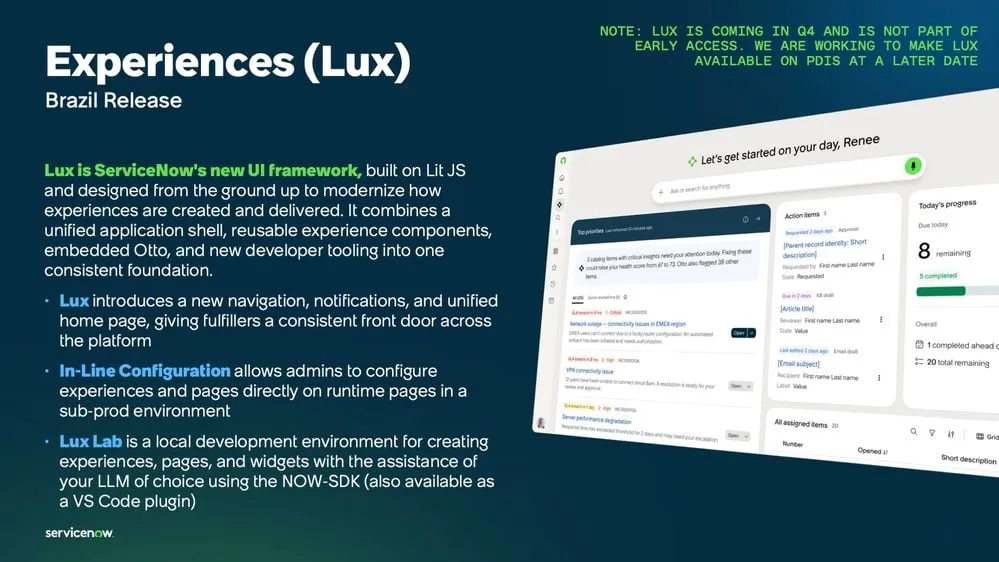
Lux is a new UI framework designed on the premise of building AI into navigation and the user experience from the start.
ServiceNow’s Developer Passport introduces Lux as follows.
- It is based on open-source technologies such as LIT, Base UI and Tailwind CSS
- It is already used in AI Control Tower and the EmployeeWorks Web App
- GA is planned for Q4 2026
- Formal documentation is also planned for Q4 2026
- It will roll out across the platform in stages from Q4 2026 into early 2027
According to the Developer Passport material, Lux introduces new navigation, notifications and a unified homepage. Fulfillers (the people who process requests) will be able to work from a common entry point across the platform. The note in the upper right of the material says Lux arrives in Q4 and is not included in early access. According to the Developer Passport explainer, availability on PDIs is also planned for Q4 2026, the same as GA.
However, existing screens will not all be replaced by Lux the moment you upgrade to Brazil.
It is explained that there are currently no plans to deprecate the existing Workspace or the Angular-based Service Portal.
On the other hand, moving the requester experience on Service Portal to Lux is under consideration. The timing is early 2027 at the earliest.
The VS Code extension “ServiceNow Lux Lab for VS Code” is also already available, but because it is pre-GA, it is not recommended for use in production.
Enhancements to developer features
Build Agent and Autonomous Engineer
ServiceNow Otto for Creator also introduces Autonomous Engineer, which is built on Build Agent.
The two are similar but used differently.
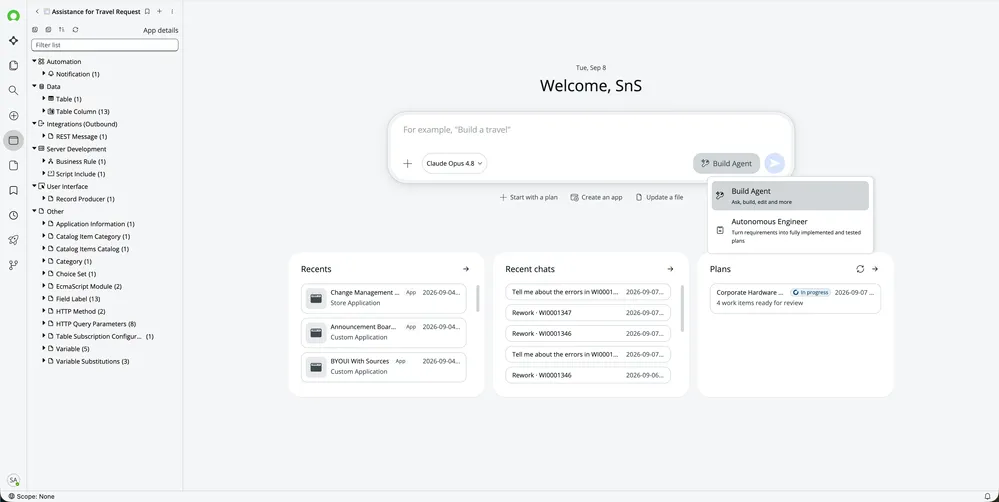
- Build Agent: when you want to develop while talking with AI in front of the screen, correcting instructions and direction along the way
- Autonomous Engineer: when you want to give clear written instructions for the scope of work and hand off a reasonably large piece of development
On the Otto for Creator screen, you choose between Build Agent and Autonomous Engineer using the switcher to the right of the input box. Build Agent is described as “Ask, build, edit and more”. Autonomous Engineer is described as “Turn requirements into fully implemented and tested plans”.
Autonomous Engineer uses the same skills and rules as Build Agent, so you can reuse your existing configuration.
However, it is not a feature you get automatically by upgrading to Brazil.
Using it requires separate conditions in addition to Brazil EA, such as an AI Workflow Factory license. It is also noted that at EA it must be enabled with a feature flag.
For instances on Brazil Patch 0 or later, a mechanism is also introduced that automatically delivers new versions of Build Agent once they are published in the ServiceNow Store.
ServiceNow Studio
ServiceNow Studio is also enhanced in Brazil.
“Open in Studio” is added to records on the platform, so you can open Studio directly from the right-click menu and elsewhere.
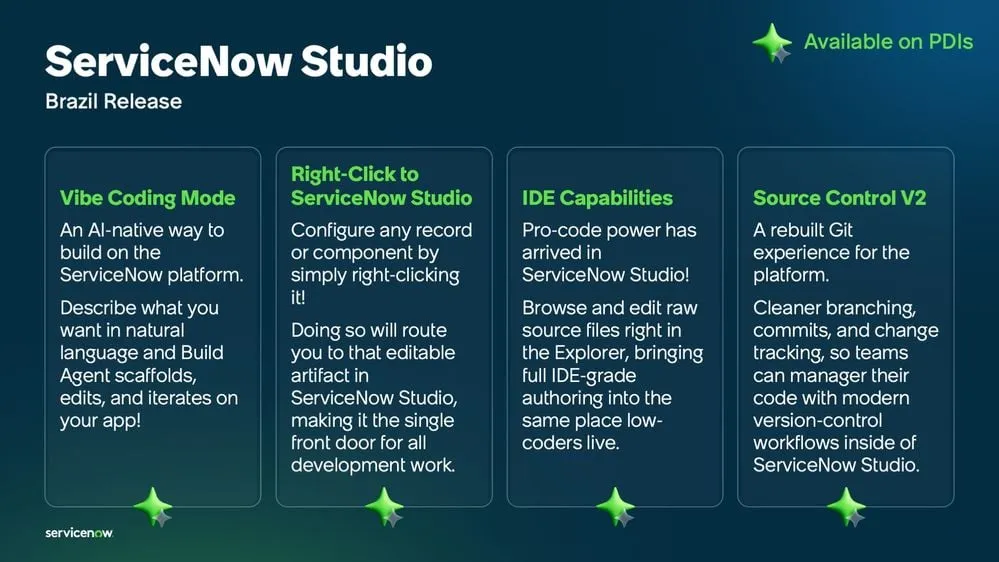
The Developer Passport material lists the following four Studio enhancements in Brazil. Opening Studio with a right-click is the “Right-Click to ServiceNow Studio” item. The upper right of the material says “Available on PDIs”, so you can try them on a PDI too.
- Vibe Coding Mode: you describe what you want to build in natural language, and Build Agent makes the first version of the app and then iterates on edits and improvements
- Right-Click to ServiceNow Studio: right-click a record or component to edit it in Studio
- IDE Capabilities: view and edit source files directly in the Studio explorer
- Source Control V2: a rebuilt Git integration that lets you work with branches and commits inside Studio and track changes
Brazil’s Studio itself also uses Lux, which is one example of the new UI framework actually starting to be used in developer features.
Collaborative Work Management (CWM)
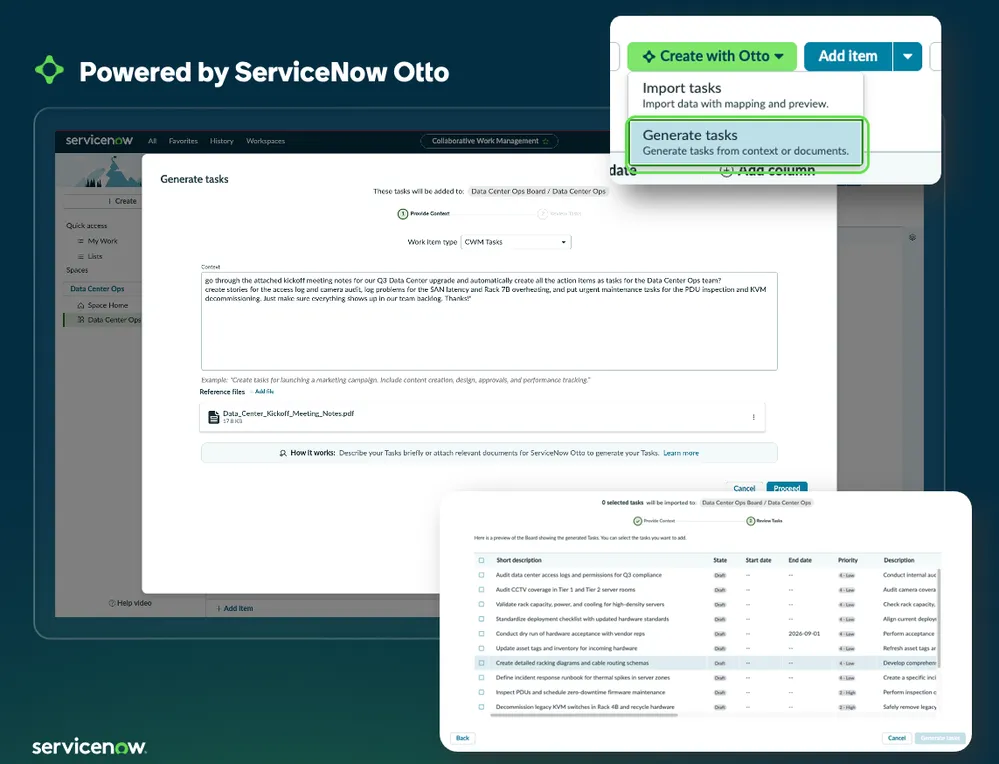
In Collaborative Work Management (CWM), Otto-powered task creation features are added.
-
Task generation
Extracts work items from natural-language instructions or uploaded documents and generates them as CWM tasks
Note: requires CWM Advanced or CWM Professional Plus -
Subtask generation
Splits an existing CWM task into smaller subtasks that can be assigned to people
Note: requires CWM Advanced or CWM Professional Plus
In ServiceNow’s material, on a CWM board, choosing “Generate tasks” from “Create with Otto” opens a field for writing instructions and a field for attaching reference files. The tasks Otto creates are shown in a list, and you review them and add only the ones you choose to the board.
CWM in Brazil also has other enhancements, including Hybrid Project Management, Lists and Dashboards.
HR Service Delivery (HRSD)
The HRSD changes center on bringing HR procedures into “EmployeeWorks” (formerly Employee Slate), the employee-facing experience. The Brazil HRSD release notes list only part of the changes. The rest appear in the release notes of individual ServiceNow Store apps, as versions from September to October 2026.
Store apps are installed on or updated in an instance, and ServiceNow says to check each app’s Store page for the supported families. A roundup by NowBen, an external site that covers ServiceNow, also lists seven features that shipped through the Store, alongside the release notes.
EmployeeWorks is the product family previously called Employee Slate. In the September 2026 release notes, Employee Slate was renamed ServiceNow EmployeeWorks Web App. Store app names put the new and old names side by side, as in “EmployeeWorks and Employee Slate.”
Employees complete HR procedures in EmployeeWorks
In EmployeeWorks Web App, the screens for the following eight task types were rebuilt, and employees can work through them with help from an AI chat.
- Approval, checklist, e-signature, and meeting booking
- Mark When Complete, document upload, URL, and watching a video
There is a note that this new experience may not work as expected unless some Restricted Caller Access (RCA) records are approved manually.
Three Store apps bring this experience to HR tasks. All are October 2026 versions.
| App | What changes | Version |
|---|---|---|
| Case and Knowledge Management for EmployeeWorks and Employee Slate | HR tasks, approvals, and delegation can be handled inside EmployeeWorks. AI summarizes tasks in plain language, and Otto reads the tasks on screen and answers questions | 1.5.0 |
| Employee Journeys for EmployeeWorks and Employee Slate | Employees see their active journeys and progress and can complete related tasks. Managers can see their team’s journeys | 1.1.0 |
| E-Signature for EmployeeWorks and Employee Slate | Employees read assigned documents and sign by typing or drawing. Signed documents are saved to the employee’s record, and the HR process moves forward | 1.0.0 |
The Employee Journeys release notes say journey tasks can be completed without switching to Employee Center Pro. Companies that use Employee Center Pro as the employee portal will likely need to decide again which experience to point employees to.
E-signature requires an EmployeeWorks Web App license. It uses two plugins: Case and Knowledge Management for EmployeeWorks and E-signature for EmployeeWorks. The e-signature credentials feature is supported from Australia Patch 8 and Brazil Patch 2.
Changes for HR agents and admins
For agents and admins, the changes are:
- AI-drafted replies: work notes and comments on HR cases can be drafted with AI, then reviewed and edited (HRSD release notes)
- Agent Workspace for HR Case Management (4.6.5, October 2026): from a case’s At a Glance, agents can email the employee’s manager without extra HR profile permissions. Skill-based HR services appear whichever of COE or Subject Person is selected first. The home screen shows AI agent worker settings
- HR Service Delivery Implementation Agents (2.1.0, October 2026): upload an HR policy document (PDF or Word), and AI agents draft HR services. It appears under “Setup & Manage Products” on the renamed “Manage Platform” tab in Admin Center
- Employee Goals (1.5.1, September 2026): admins can configure AI-generated natural-language queries on goal data
The release notes for version 1.2.0, from September 2026, explain how Implementation Agents work. A configuration console guides you through HR Core, document templates, and Agent Workspace settings in order, and Now Assist AI agents do the configuration work itself from natural-language instructions. They can create:
- HR users and companies
- Chat and email settings
- HR topics and topic categories
- Record producers
- HR templates
Implementation Agents also include a component check that confirms the required HR groups, roles, departments, and locations exist before configuration proceeds.
Deprecated features
In the HRSD release notes, the following three features are deprecated and can no longer be newly activated.
| Feature | Replacement |
|---|---|
| HRSD Process Mining Content Pack (com.sn_hr_process_optimization) | The unified Process Mining Content Pack, installed automatically on upgrade to Brazil or later |
| Virtual Agent Conversations for HR Service Delivery | AI Native SKU |
| Issue Auto resolution for HR | AI Native SKU |
The HRSD Process Mining Content Pack stays active on the instance after the upgrade. Moving to the unified version is required to get new features and support, but ServiceNow says there are no manual steps and existing configuration carries over automatically.
Who should check what
Brazil covers a wide range of features, so it is easier to take in if you split what to look at by role.
| Who | What to check mainly |
|---|---|
| Admins | Changes / Deprecated features / Upgrade notes / Patches |
| Developers | ServiceNow Studio / Build Agent / SDK / Fluent |
| AI feature owners | ServiceNow Otto / AI Agent Studio / Autonomous Engineer |
| UI developers | Lux |
| CWM users | Otto Task Generation / Hybrid Project Management |
| HRSD owners | HR tasks in EmployeeWorks / E-signature / Implementation Agents / The three deprecated features |
What to check before upgrading
When planning an upgrade to Brazil, it is easier to sort out if you check in this order.
- Check the upgrade path from your current version to Brazil in “Upgrade to the Brazil release”
- Identify behavior changes to existing features in “Changes to Brazil features and products”
- Check deprecated and scheduled-for-removal features and plugins, and consider alternatives if you use them
- Run regression tests on a PDI or sub-production environment to check the effect on customizations and external integrations
- Check available patches in “Available patches and hotfixes” and decide which version to apply
For the full plan, including how to pick dates and when you can roll back, see “ServiceNow Brazil upgrade: paths, 7 stages and rollback”.
Brazil is still in the EA period. Specifications and conditions of availability may be updated toward GA, so when you make a formal upgrade plan, check the latest official release notes.
Changelog
- Added a section on HR Service Delivery (HRSD). Checked the HRSD and ServiceNow Store app release notes for changes such as HR tasks in EmployeeWorks, e-signature, and Implementation Agents, and for three deprecated features
Spotted an error or something out of date? Let me know on X.
Related notes
ServiceNow
ServiceNow Brazil upgrade: paths, 7 stages and rollback
How to upgrade to ServiceNow Brazil: upgrade paths from Australia, Zurich or Yokohama, the official 7 stages, testing, the 10-day rollback limit and year-end timing.
7 min
ServiceNow
How Now Assist counts assists and where to check them
Now Assist bills in assists, not tokens: 1 for a simple skill, 25 to 150 for agentic workflows. Where to check usage by skill, and settings that cap overuse.
9 min
ServiceNow
ServiceNow Four Zeros: adoption blueprints for autonomous IT
ServiceNow's "Four Zeros," posted October 19, 2026, is not a product but a guide to ordering ITSM, ITOM, and CMDB. The four goals, the phases and gates, and open questions.
9 min