What is ServiceNow Flow? The AI service desk for Slack and Teams, and what it costs
TL;DR
- Flow is an AI service desk for chat tools such as Slack and Teams, and for email. It works without a ServiceNow instance and does not replace ITSM processes such as change and problem management
- A resolved case can be turned into an automation in one click, and automations can start from schedules or webhooks as well as chat. The design grows coverage of repeat requests without writing knowledge articles
- New customers pay a $10,000 annual minimum plus $2 per conversation and $1 per automation run. Availability and Japanese-language support in Japan are not stated in the sources I could find
Contents (7)
ServiceNow announced Flow, an AI service desk, on October 1, 2026. It handles repeat requests, such as password resets and access requests, inside Slack and Teams. Three questions stand out: how it differs from the existing ServiceNow ITSM and the AI features that appeared in 2026, how it is billed, and whether it is available in Japan. I check them in turn against the press release, ServiceNow’s own community post and press coverage.
It does not replace ITSM
The press release describes Flow as “a new standalone product”. The FAQ in the community post is more specific.
- You don’t need a ServiceNow instance. Flow runs on its own multi-tenant cloud
- Existing customers can connect it to their instance and sync in both directions. This isn’t required
- Customers who need operations built around change management, problem management and the CMDB stay on ITSM. Existing customers can run the two side by side
SiliconANGLE writes that Flow is built on a “completely new technology foundation”. The main audience is companies that have avoided ITSM because of its complexity, plus departments, sites and acquired business units inside companies that already use ServiceNow. ServiceNow’s briefing material also says it is “not a replacement for enterprise ITSM”, and it expects a company with a full ITSM deployment to use Flow for only certain departments or sites.
ServiceNow shipped other AI features in 2026 as well. According to press coverage, these are the L1 service desk AI specialist (an agent that handles IT requests autonomously), released in February, and “Otto”, a chat layer released in May. A ServiceNow spokesperson told The AI Economy that Flow does not run on Otto. I couldn’t find an official explanation of how it relates to the L1 specialist. That article treats it as delivering the same experience inside chat apps.
How one request flows through
A user writes a request in a Slack or Teams channel, or messages Flow directly. Email is handled the same way. Flow looks for an answer in the connected knowledge, and hands complex or sensitive requests to a human agent. The agent sees a single queue that combines requests and incidents on the web, and replies from there. The reply is posted to the channel where the user was talking.
The demo SiliconANGLE described goes like this.
- An employee asks in Slack about company holidays, and gets an answer with a link to the source document
- The employee then says they can’t access the HR system. Flow asks whether to open a ServiceNow incident, and asks about the situation
- In the automation example, it sends VPN instructions, checks whether access has returned, decides whether approval is needed, and asks the manager for approval if so
The design is that Flow answers what is in the knowledge, and hands off to a person when it isn’t. Other bots and AI assistants can also call Flow through an API or MCP.
How automations are built
What sets Flow apart is the step that turns a resolved case into an automation. When an agent clicks once, Flow handles the next identical request on its own. The press release says you don’t have to write a new knowledge article.
You can also build an automation by describing it in text. As an example, The AI Economy cites the instruction “automate IT onboarding that sets up new hire email and Okta access”. Flow looks for available integrations, chooses the actions to run, and saves the result. The integrations are more than 100 prebuilt connectors, covering knowledge, assets and tickets, and also serving as targets for actions.
A finished automation can start from a schedule, a webhook, an API call or an event in a connected system, as well as from a chat message.
None of this covers how Flow handles wrong answers from the AI. According to The AI Economy, an organization can designate the scope where it wants formal controls. The sources I could find don’t detail how far Flow acts automatically in areas that aren’t designated.
Getting started, and where it can stall
The community post describes getting started as three connections: single sign-on, a Slack or Teams workspace, and knowledge. Then you start handling requests. ServiceNow says you can be up and running “within a day”, but it also notes when it may take longer: when the person doing the setup isn’t also the admin of the systems being connected. In that case, you may wait for connection approvals.
Improvement after rollout is part of the product. Flow looks at how a team uses it and points out the requests most worth automating next.
At announcement, Flow centers on IT department requests. According to The AI Economy, ServiceNow plans to extend it to CRM, customer support and procurement.
Pricing is per conversation and per automation
At announcement, press coverage reported “usage-based pricing, with specific rates not disclosed” (SiliconANGLE). The FAQ in the ServiceNow community post later listed the following pricing.
| Contract type | Details |
|---|---|
| Trial | Free for everyone. No credit card required. According to CIO, it is free during the limited-availability period |
| Existing ServiceNow customers | Use the Assist units they already have, or buy more through their account rep or a partner |
| New customers | Buy in the product with a credit card. Annual minimum of $10,000 |
| One conversation | $2 (10 Assist). Consumed whether or not it leads to an automation |
| One automation run | $1 (5 Assist) |
The $10,000 minimum corresponds to 5,000 conversations a year, if you use conversations only and no automations. This is my own calculation.
For comparison, take Salesforce’s IT Service Desk. Agentforce’s employee agent costs $15 per user per month (the page shows ¥1,800 per month in Japanese yen), with unlimited Agentforce actions for employee use. It supports Slack, Teams, a portal and chat.
With Flow you pay by volume, and with Salesforce you pay by headcount. Dividing $15 a month by Flow’s $2 gives 7.5, so Salesforce comes out cheaper if one person has more than about 7.5 conversations a month. The scope covered differs, so a simple comparison isn’t possible. The reasonable takeaway is only a rule of thumb: organizations with many employees and light usage suit Flow’s billing, and organizations with heavy usage suit per-user billing.
What analysts say
CIO quotes an analyst at Dickson Research who says ServiceNow is selling Flow on removing what its own ITSM demands: an implementation project, a CMDB migration and infrastructure. The same analyst points out that because Flow’s interface is Slack or Teams, the chat platform ends up owning the daily usage habit, which could affect ServiceNow’s relationship with customers. An analyst at Moor Insights & Strategy says the real question is whether Flow can complete requests across multiple systems while preserving permissions, approvals and handoffs to people. None of these are product reviews. Read them as points to check before adopting it.
Availability, and what is still unclear
According to the press release, availability is currently limited. North American customers get priority for the first few weeks, and general availability is planned to begin in North America and EMEA in the fourth quarter of 2026. CIO reports, citing a ServiceNow representative, that further regional expansion after that is expected in the first quarter of 2027. According to the same article, existing customers with an AI services subscription can use Flow with no additional license cost by drawing on the Assists they already have. The AI Economy also writes that general availability begins in North America on October 6 for existing ServiceNow customers. Sign-up is open at letsflow.ai.
Of the points readers in Japan are likely to care about, the sources I could find had no answer on these three.
- When it will launch in Japan. The only regions listed are North America and EMEA
- Whether it can hold conversations in Japanese. I couldn’t find the supported languages in any source
- Where data is stored. Flow runs on its own multi-tenant cloud, but the sources I could find don’t say in which region it is hosted
The relationship between Flow and “ServiceNow Otto”, which is being reorganized in the upcoming Brazil release, also rests on a single point from the spokesperson: “Flow doesn’t run on Otto”. I cover the Brazil release in a separate article.
If you are considering it, a sensible first step is the free trial. Use it to check the quality of answers to requests written in Japanese, and whether the connectors work with your own knowledge sources and identity platform.
Changelog
- Added, based on CIO's coverage, that the limited-availability period is free, that existing customers can use it in North America, that regional expansion after EMEA is expected in the first quarter of 2027, and analysts' views
- Corrected an error that said pricing was not disclosed. Added the pricing structure, supported channels and relationship to ITSM from the ServiceNow community post, and added how the billing model differs from Salesforce
Spotted an error or something out of date? Let me know on X.
Related notes
ServiceNow
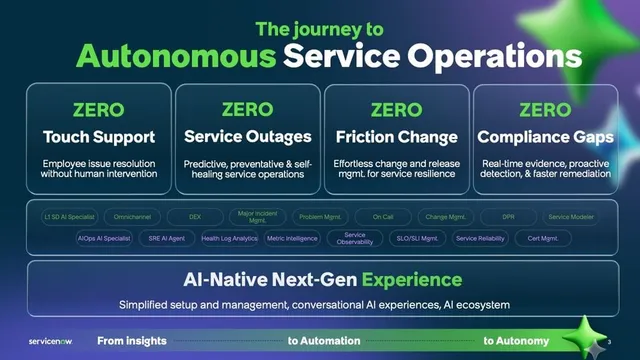
ServiceNow Four Zeros: adoption blueprints for autonomous IT
ServiceNow's "Four Zeros," posted October 19, 2026, is not a product but a guide to ordering ITSM, ITOM, and CMDB. The four goals, the phases and gates, and open questions.
9 min
ServiceNowAI
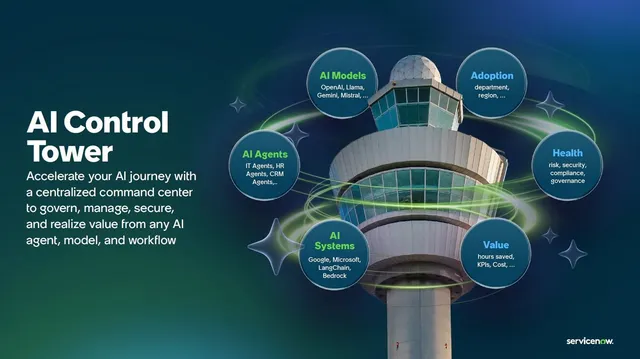
ServiceNow AI Control Tower: a control tower for your AI
ServiceNow AI Control Tower puts every AI in one inventory to approve, monitor, stop and track cost (GA May 2025). Five pillars, roles, licenses, Agent 365 and unknowns.
9 min
ServiceNowSecurity
ServiceNow AI Passport: AI agent permissions at runtime
ServiceNow AI Passport (announced October 15, 2026) gives each AI agent a signed credential checked at runtime. How it differs from AI Gateway, NVIDIA's role, and open questions.
7 min