Automation · AI
Can Lightpanda 1.0 replace headless Chrome?
TL;DR
- Lightpanda is a headless browser written from scratch in Zig, not a Chromium fork. It runs JavaScript on V8, the same engine as Chrome, but has no layout or rendering. It reached 1.0 on October 2 and left beta
- In the official benchmark, crawling 933 pages with 25 in parallel took 4.81 seconds and 123MB. Chrome took 46.70 seconds and 2.0GB. Chrome added tabs within one browser while Lightpanda added processes, and the developer ran the tests
- Puppeteer, Playwright, and chromedp connect over CDP, and Selenium over WebDriver BiDi, so you can try it for jobs that pull text or values from pages. But screenshots return a placeholder image, and element positions do not come from real layout. Playwright itself calls its CDP connection lower fidelity
- The license is AGPL-3.0. Usage telemetry is on by default and can be turned off with the LIGHTPANDA_DISABLE_TELEMETRY environment variable. The User-Agent cannot contain "mozilla", so it cannot be used for crawling that poses as Chrome
Contents (5)
Much scraping, end-to-end testing, and feeding of web pages to AI agents runs headless Chrome from Puppeteer or Playwright. Chrome keeps doing rendering work even though nothing appears on screen, so running hundreds of instances eats memory and CPU. Lightpanda is a browser that never had that rendering part to begin with.
Version 1.0 was released on October 2, and the beta label came off. How much of the Chrome work running today can move to Lightpanda? I checked the conditions behind the speed numbers, where it behaves differently from Chrome, and its license and telemetry against the official documentation and repository.
A browser that does not render
Lightpanda is written from scratch in Zig, not based on Chromium or WebKit. That said, not everything is homemade. According to the “Status” section of the README, it runs JavaScript on V8, the same engine Chrome uses. HTML parsing uses Servo’s html5ever, and networking uses libcurl.
What differs from Chrome is that it has none of the steps that turn a page into pixels, such as style calculation, layout, and paint. The architecture overview says it was built on the idea that machines use the DOM, not a picture of the screen. The browser’s job ends at fetching the page, running scripts, and reading and writing the DOM in memory.
The developers write that at a previous company they ran fleets of headless Chrome to collect data from more than 20 million pages a day, and the cost and operational burden led them to start this project. According to the 1.0 announcement, when the beta went public in November 2024, many sites failed to load because Web APIs were missing.
There are five ways to use it, each started as lightpanda <command>.
| Command | Suited for |
|---|---|
fetch | One-off fetches that print the HTML or Markdown after JavaScript runs to standard output |
serve | Becomes a CDP server that Puppeteer, Playwright, and chromedp connect to. With --protocol webdriver, it also speaks WebDriver BiDi |
mcp | Becomes an MCP server, used as a tool by AI agents |
agent | Takes requests in natural language and records the actions |
run | Replays a recorded script without an LLM |
With --dump markdown, fetch outputs the page as Markdown after JavaScript runs. According to the Markdown and accessibility tree guide, specifying semantic_tree outputs the accessibility tree as JSON. There is no need to convert HTML with another tool before handing it to an LLM.
The conditions behind “9x faster, 16x lighter”
The official benchmarks page lists three measurements against headless Chrome. The first and second compare against Chrome 143, and the developer ran all of them.
The first crawls 933 pages of a demo product catalog by following links. It runs on an AWS m5.xlarge and drives both browsers from Go’s chromedp with the same code.
| Parallelism | Lightpanda | Chrome |
|---|---|---|
| 1 | 51.68 s, 27.2MB | 82.83 s, 1.3GB |
| 5 | 11.70 s, 43.9MB | 45.66 s, 1.6GB |
| 25 | 4.81 s, 123.0MB | 46.70 s, 2.0GB |
| 100 | 5.23 s, 410.2MB | 69.37 s, 4.2GB |
The chart at the top of the README also shows the results of this crawl.
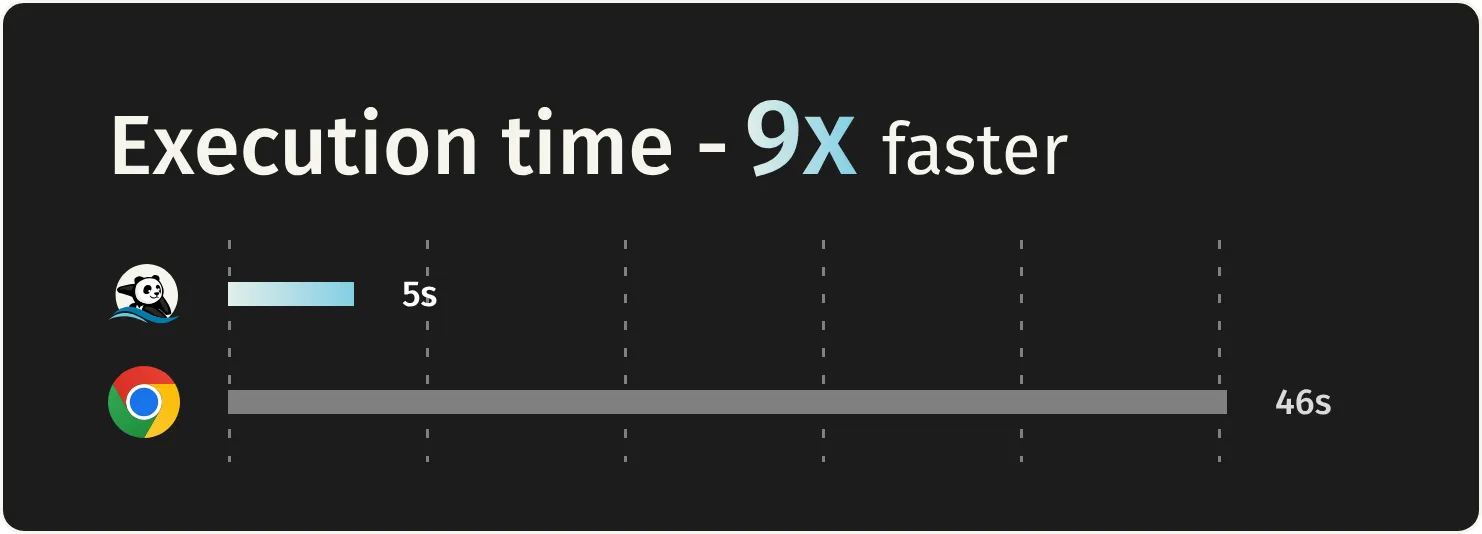
“9x faster, 16x lighter” comes from the 25-parallel row. Watch how parallelism is counted. Chrome adds tabs within one browser, while Lightpanda adds processes. That is because Lightpanda cannot open multiple tabs in one process, and the developer says each setup matches how the browser is used in production. Chrome stops getting faster beyond 5 in parallel, reportedly because tabs compete for the resources of the same process.
The second loads a page that pulls product information and reviews over XHR, 100 times from Puppeteer, and extracts the values. The average per load was 16ms for Lightpanda and 185ms for Chrome, and peak memory was 21.2MB for Lightpanda and 402.1MB for Chrome. The page was served from a local web server, so network latency is not in the numbers.
The third is AI agent accuracy, and here the effect of not rendering shows. It pairs Vercel’s agent-browser with Claude Sonnet 4.6 and swaps only the engine from Chromium to Lightpanda. On GAIA level 1, accuracy dropped from 84.9% to 81.1%. According to the developer, on some pages Lightpanda’s text-only output missed content that would have been visible on a rendered page. On AssistantBench, both engines scored the same 57.6%.
The 1.0 announcement also quotes companies using it in production. Keenable, which builds search for AI agents, says it is 4x faster than Chromium and 6x more cost-efficient. DeveloperHub.io, which moved prerendering off Chrome, says pages are returned 4x faster and the load average, a measure of server load, fell to one-tenth. All of these are user figures published on the developer’s blog, and Keenable’s numbers come with no test conditions.
Where it does not behave like Chrome
From Puppeteer or Playwright, you only change the connection target. In the Playwright guide, you connect to a server started with lightpanda serve using chromium.connectOverCDP('ws://127.0.0.1:9222'), and the rest of the code stays the same. But the following four things do not work the same as in Chrome.
Anything that relies on screen pixels does not work. According to the architecture overview, CDP’s Page.captureScreenshot returns a placeholder image, not an actually rendered one. Element sizes are approximations from CSS and HTML attributes, and positions are values built from DOM depth and sibling order. Tests that compare how a screen looks, or that click by coordinates, stay on Chrome. The --dump png and --dump pdf outputs mentioned in the README also render only text.
Web standards support is about 80% of Chrome’s. As of 1.0, Lightpanda passes 1,739,845 subtests of the Web Platform Tests. Chrome passes 2,184,491, and the developer says more than half of the gap is in CSS, editing, and SVG tests. They also write that in April 2026 the character encoding tests started passing, and the count jumped within a few days. Those tests contain about 1.15 million subtests, most of them auto-generated character mapping tables. It seems wise not to read the ratio of counts as the share of sites that work.
Playwright connects over CDP. Playwright’s connectOverCDP documentation says a CDP connection is significantly lower fidelity than Playwright’s own protocol connection, and recommends its own protocol for advanced features. Rather than moving a whole Playwright test suite, it seems safer to start with jobs that fetch a page and read values.
One process opens one tab. To run in parallel, you start multiple processes on different ports. If you move from a setup that opens many tabs in one Chrome process, how you start and monitor the browsers changes too.
What to check before using it
The license is AGPL-3.0. Under this license, if you let users interact with a modified program over a network, you must offer those users the source. The obligations differ depending on whether you only use it for internal crawling or modify it and provide it externally, so it likely needs checking against your organization’s policies before you build it in. Contributors who send pull requests are also asked to sign a CLA (contributor license agreement).
Usage telemetry is on by default. According to the local vs. cloud comparison, it sends whether TLS was used, whether a page or an iframe was opened, and the LLM provider and model name used by the agent. It says it does not include the URLs opened or page content. Setting the LIGHTPANDA_DISABLE_TELEMETRY environment variable stops it.
It cannot pose as Chrome. According to the best practices guide, --user-agent rejects values containing “mozilla.” It also always sends the Sec-Ch-Ua: "Lightpanda";v="1" header. It appears to be designed on the premise that crawlers identify themselves. There are also settings to obey robots.txt with --obey-robots and to sign your own requests with Web Bot Auth. It looks hard to use on sites that only let in ordinary browsers.
On Windows, run it inside WSL. The system requirements page lists Debian 12, Ubuntu 22.04 and 24.04, and macOS 13 or later, plus Windows 10 or later with WSL. The README, on the other hand, says there is no Windows-native binary and you install it inside WSL. The Linux binary depends on glibc, so it does not run on musl environments such as Alpine.
The cloud version is a separate contract. The developer also offers Lightpanda Cloud, which runs the same engine. It bills by the time a browser is open, and there is a free plan. CDP connections are cut after 15 minutes, and the agent and fetch are not available in the cloud. The URLs you open and the content you fetch pass through the developer’s servers, so if you handle data that cannot leave your environment, you run it locally.
Starting with 1.0, CORS restrictions apply by default to fetch() and XMLHttpRequest. The developer explains that because AI agents open pages whose content no one has checked, without CORS checks a malicious page could call internal services and read the results. However, it passes 371 of 463 CORS tests, so some remain. There are also settings such as --block-private-networks to block requests to private addresses and cloud metadata endpoints.
Jobs that move easily, and jobs that stay
The easiest jobs to try moving are those that pull text or values from pages whose content JavaScript builds. Crawling, indexing for search, prerendering, and having AI agents read pages fall here. The more you run in parallel, the more the memory gap matters.
What stays on Chrome are screenshots, visual comparisons, clicking by coordinates, and tests that depend on how CSS displays. Some agent platforms that can use Lightpanda, such as Hermes, are built to hand only unsupported operations such as screenshots to Chrome.
Linuxiac’s article also writes that Lightpanda deliberately leaves visual rendering checks out of scope. To compare on your own site, the quickest way seems to be to fetch a page you currently crawl with lightpanda fetch --dump markdown <URL> and see whether the content matches what Chrome gets.
Related notes
AI
Anthropic's role-based plugins: what they add to Claude Code
I read the 123 entries in knowledge-work-plugins, a role-based plugin catalog built for Cowork, then installed some in Claude Code to check always-on tokens and MCP connections.
6 min
AI
What is REA? 300,000+ GitHub stars and the real "two weeks"
REA, an MCP server giving reverse engineering tools to AI agents, drew GitHub stars fast in October. Star counts, repo dates, what Ghidra and others do, and a static Electron test.
7 min
ServiceNowAI
ServiceNow AI Control Tower: a control tower for your AI
ServiceNow AI Control Tower puts every AI in one inventory to approve, monitor, stop and track cost (GA May 2025). Five pillars, roles, licenses, Agent 365 and unknowns.
9 min